Filing your sole trader income tax return (IR3) in myIR
Get the books right, generate the IR3 figures, then key them into myIR box by box — with the business-use percentages, the logbook and the IR10 behind every number. Also: why the tax shown here is not your final tax bill.
Sole traders · 15 min read · Updated October 2026
1. Open the Income Tax tab and pick the year
A sole trader files one IR3 for each income year, which ends on 31 March. It is due on 7 July, or later if you have a tax agent. An IR3 covers everything you earned in the year; this page covers the business half of it, worked out from your books. Everything in this guide happens on one page: Tax › Income Tax.
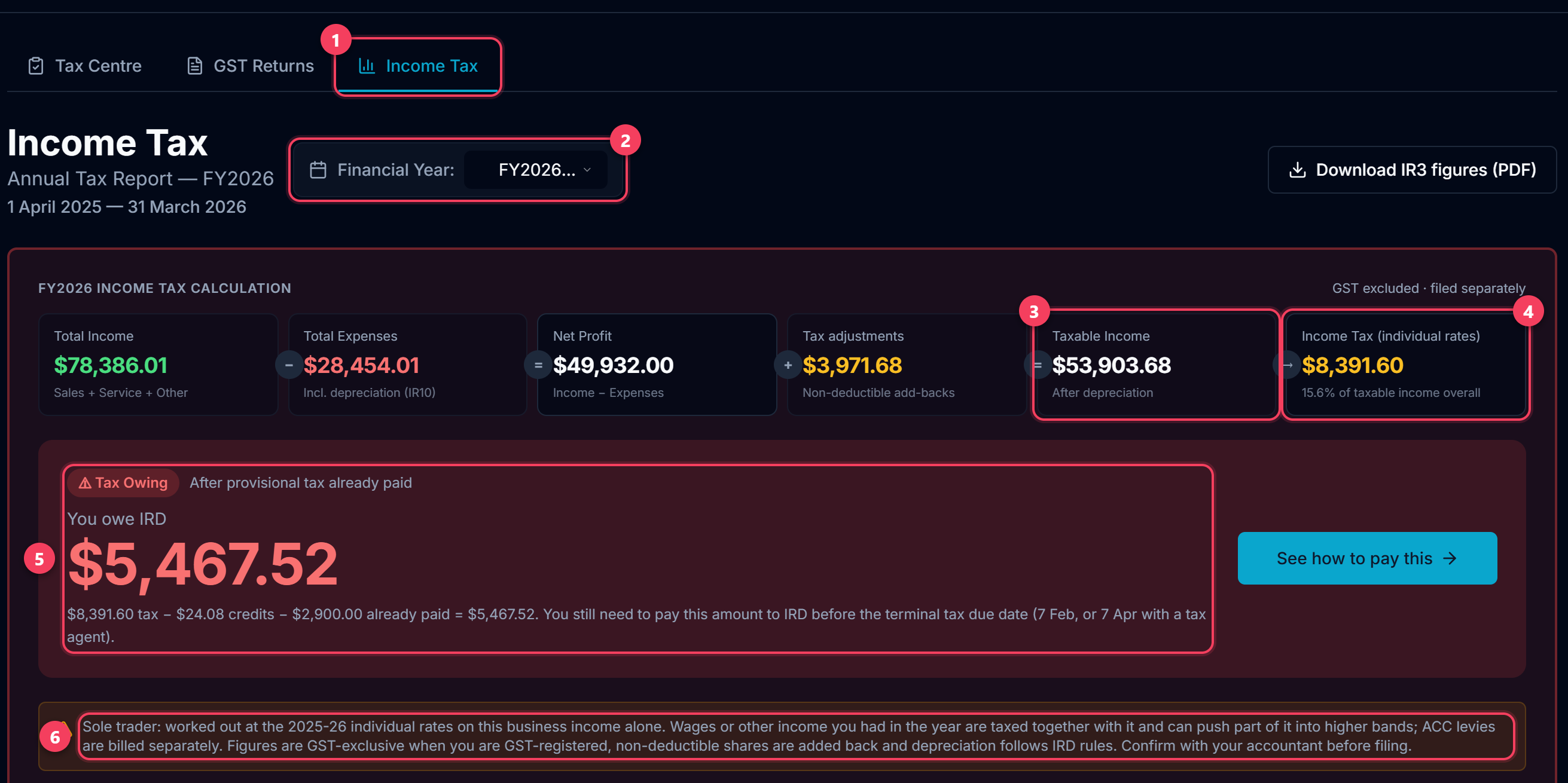
- Tax › Income Tax. The business is you, so the profit is taxed at the individual rates and the return is an IR3, not a company IR4.
- The income year. FY2026 is 1 April 2025 to 31 March 2026. The page opens on the last year that has ended.
- Taxable income: the profit from your books after depreciation, with the non-deductible shares of your costs added back.
- The tax on it at this year's individual rates, worked out band by band — not one flat rate.
- What is left to pay after your tax credits and the provisional tax you already paid during the year. A negative figure is a refund.
- Read this line every time. It is the tax if the business were your only income.
Tip: The figures are only as good as the books. Do the next three steps before you generate anything.
2. Check that LedgerMind knows you are a sole trader
A company pays 28% on every dollar of profit. A sole trader pays the individual rates, which start at 10.5% and climb. On the same books the two answers are nowhere near each other, so this setting decides whether everything below it is right. Settings › Business structure.
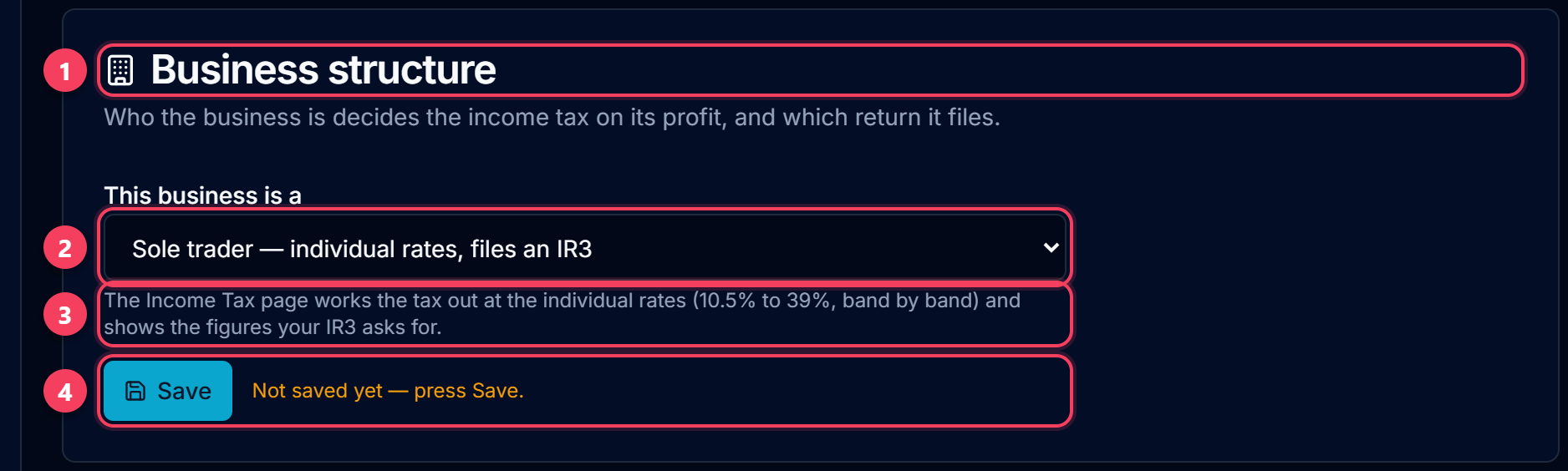
- Settings, down at Business structure.
- "Sole trader — individual rates, files an IR3". Choose Company only if the business is a registered company with its own IRD number. If you simply trade under a business name, you are a sole trader.
- What the choice changes: the rates the tax is worked out at, and the return the figures are laid out for.
- Press Save. This card has its own Save button, separate from the one at the bottom of the page — changing the dropdown and leaving the page does nothing.
Tip: New sign-ups answer this on the setup screen. Accounts made before this existed are asked once, in a panel at the top of the Income Tax page.
3. Check the Fixed Asset Register
Depreciation and the fixed-asset lines of the balance sheet come straight from Records › Fixed Assets. Most mistakes on a filed return start here: an asset entered at the wrong cost, or an asset typed into myIR that was never in the register.
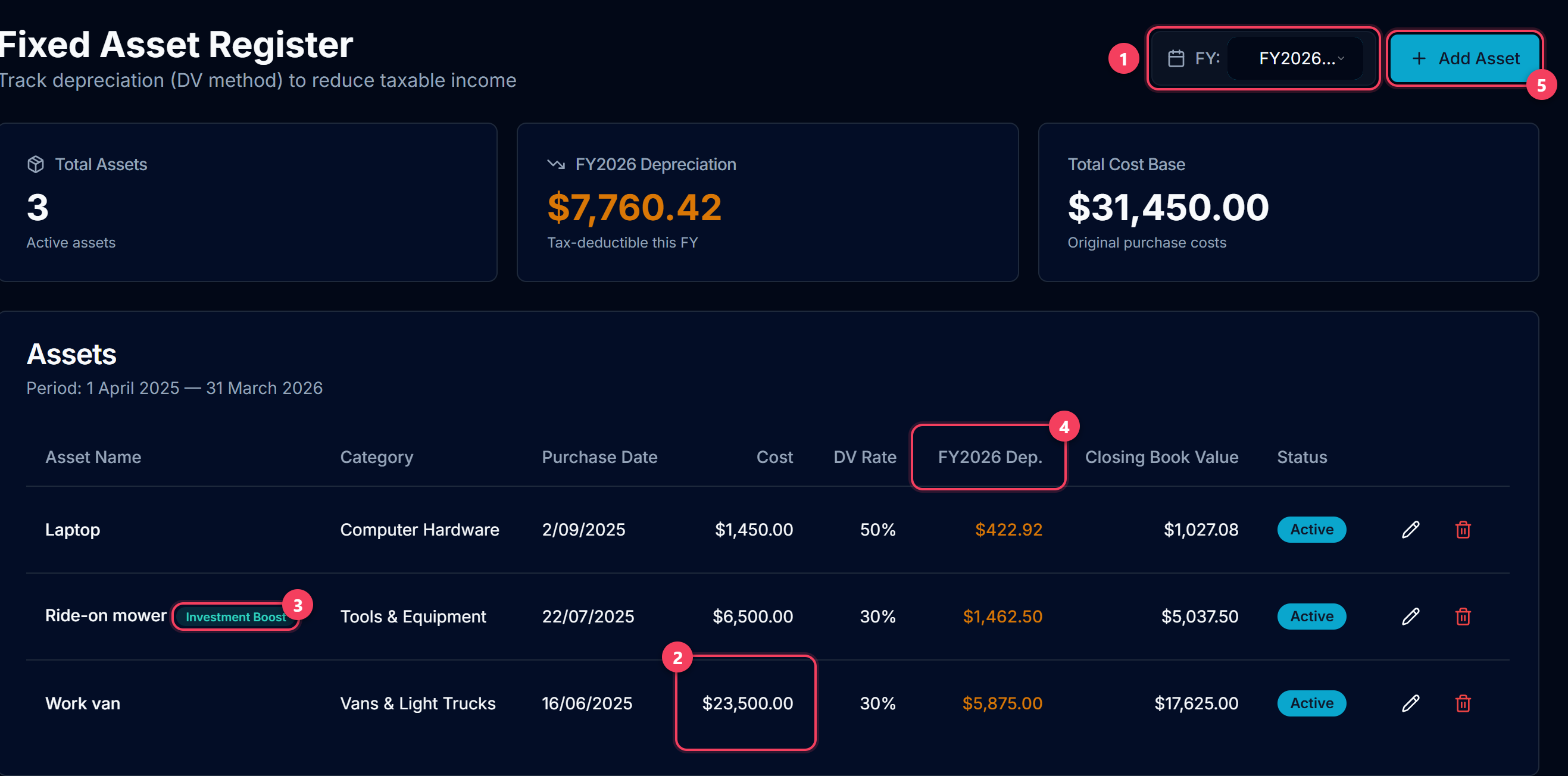
- The income year. The register opens on the current year, so switch it to the year you are filing.
- Cost. If you are GST-registered and claimed the GST when you bought the asset, enter the GST-exclusive price: a van at $27,025 goes in as $23,500. Entering the GST-inclusive price overstates the depreciation by 15% every year.
- Investment Boost. An asset that is new (or new to New Zealand) and first used on or after 22 May 2025 can have 20% of its cost deducted for tax in the year you buy it, with the rest depreciated as usual. Tick it on the asset and the return claims it.
- This year's depreciation, worked out by IRD's diminishing-value method at the rate for that kind of asset.
- Add every asset you own and use in the business: vehicle, trailer, mower, tools, laptop. Anything that cost $1,000 or more belongs here and is depreciated, not claimed as an expense in one go.
Tip: Paid for it out of the business account? Categorise that bank line Fixed Asset Purchase. The cost is claimed through depreciation, so the line itself is not an expense — categorised as tools or materials it would be claimed twice. The checks then compare what you bought against what the register holds. An asset you also use privately still goes in at its full cost; the private share is dealt with separately, which is the next step.
4. A vehicle you also drive privately: the logbook
A company can put a car through FBT. You cannot: fringe benefit tax is an employer's tax on an employee, and you are neither. A sole trader deducts the business share of the vehicle, and a logbook is what measures it. Records › Vehicle Logbook.
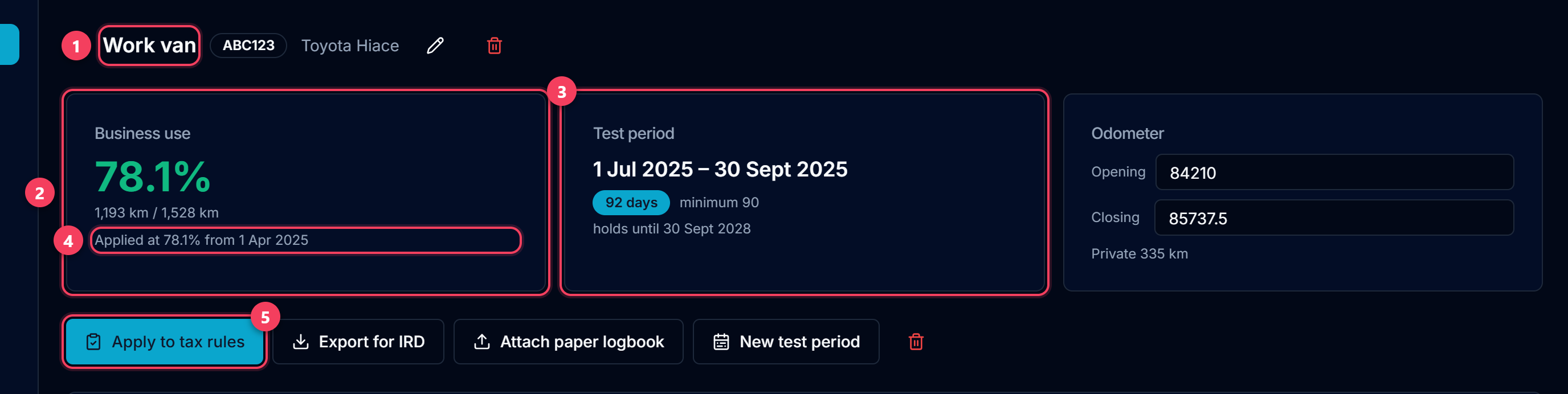
- The vehicle. Link it to the asset in the register, so the same percentage reaches the depreciation as well as the running costs.
- The business share the journeys actually measure: business kilometres over the whole distance for the period.
- The test period. IRD asks for at least 90 consecutive days that represent your normal travel, with the odometer read at each end. The result then holds for three years unless the way you use the vehicle changes.
- The percentage that has been applied to your tax rules. This is the one the return uses — a logbook sitting there unapplied changes nothing.
- Apply to tax rules writes it to the vehicle categories, from the date you choose. It applies going forward; GST periods you have already filed are not restated.
Tip: With no logbook, IRD's default for a vehicle used both ways is 25% — which is what LedgerMind starts with. If you drive more than that for work, the logbook is worth the 90 days.
5. Fill in the Return details
A few things on the IR3 are not in your bank statements. Enter them once under Return details; next year they carry forward on their own.
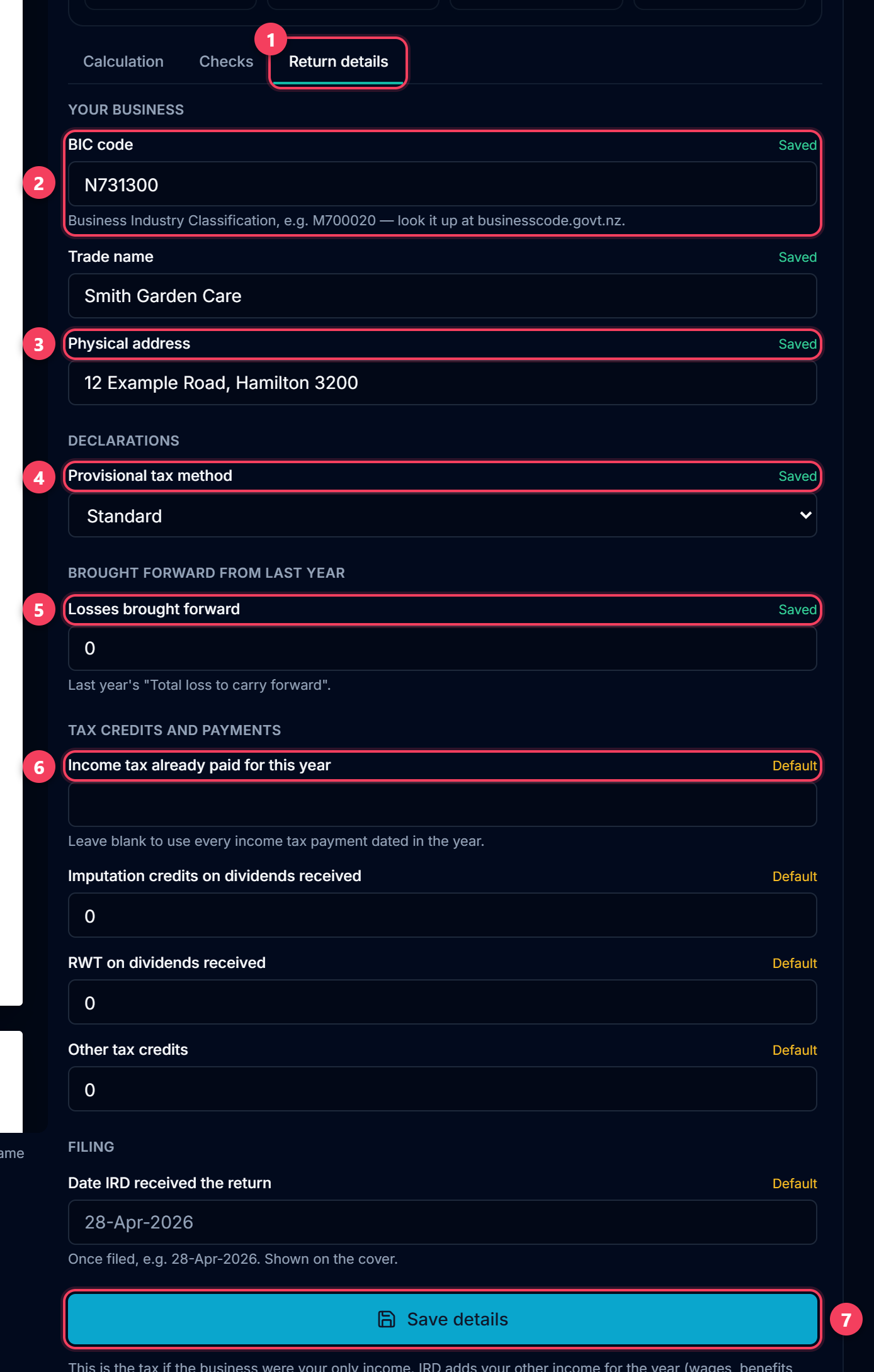
- The Return details tab, beside Calculation and Checks.
- BIC code: the Business Industry Classification code for what you do, for example N731300 for gardening services. Look it up at businesscode.govt.nz.
- Trade name and physical address: the business name you trade under, and where you work from. Both start from your Settings.
- Your provisional tax option. Most sole traders are on Standard.
- Losses brought forward: last year's "Total loss to carry forward". If you generated last year's return here, it is already filled in.
- Income tax already paid for this year. Leave it blank and every payment categorised Income Tax Payments and dated in the year is counted — which is usually what you want.
- Press Save details at the bottom. The return recalculates straight away.
6. Generate the return
Press Generate IR3 figures. LedgerMind works through your books in twelve steps and fills in the matching boxes on the left as it goes, so you can see where each figure lands.
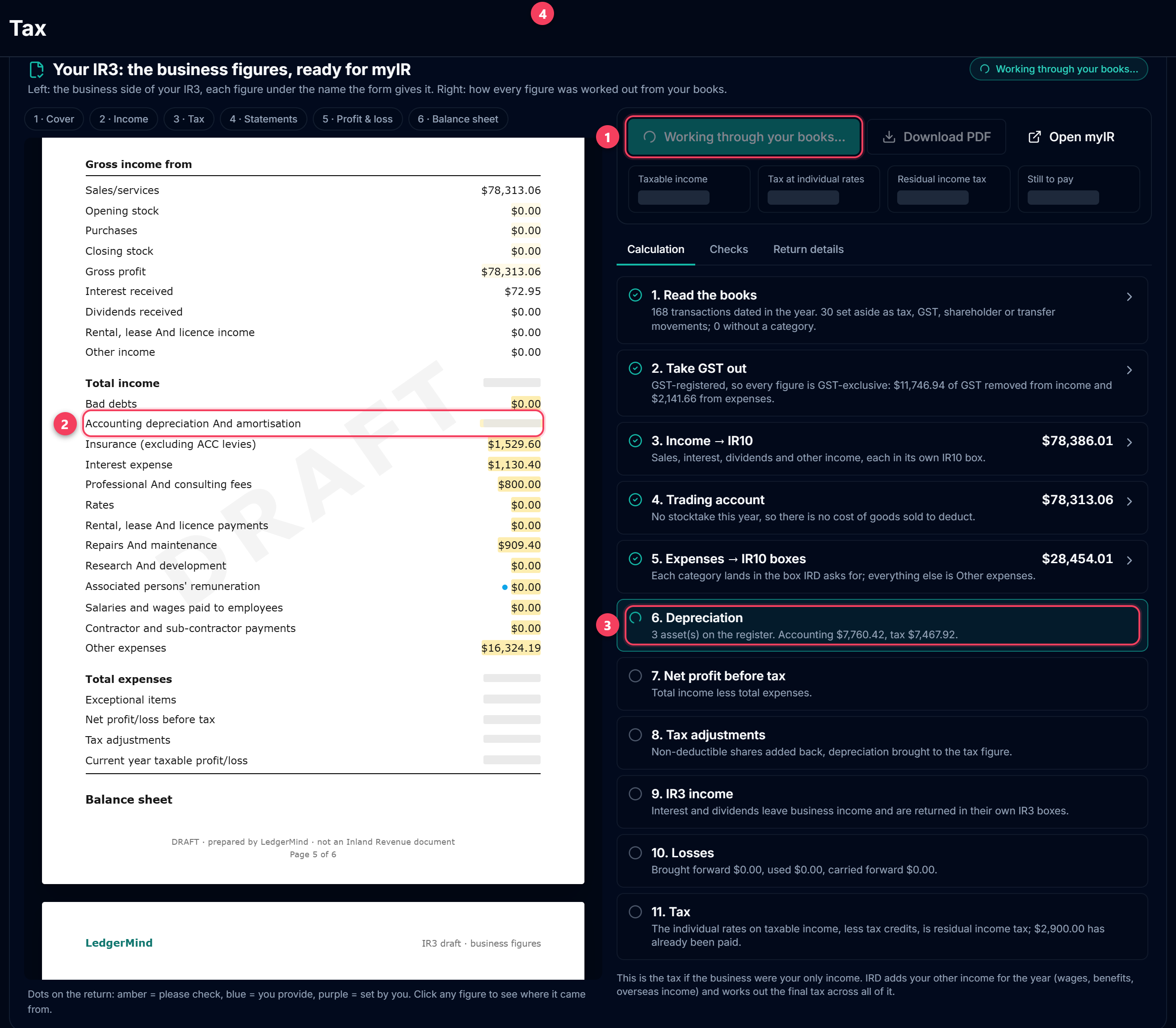
- Generate. It keeps a copy of this version; next year's opening figures come from it, and a later change to the books shows as "figures changed since…" instead of quietly moving.
- The boxes being filled in right now light up on the return.
- The step being worked on. Afterwards, click any step to open the lines behind it.
- The headline figures appear once the tax step is done: taxable income, the tax at the individual rates, residual income tax, and what is still to pay.
7. Work through the checks
Before you file, open Checks. It re-runs the arithmetic IRD enforces and points out anything in the books worth a second look.
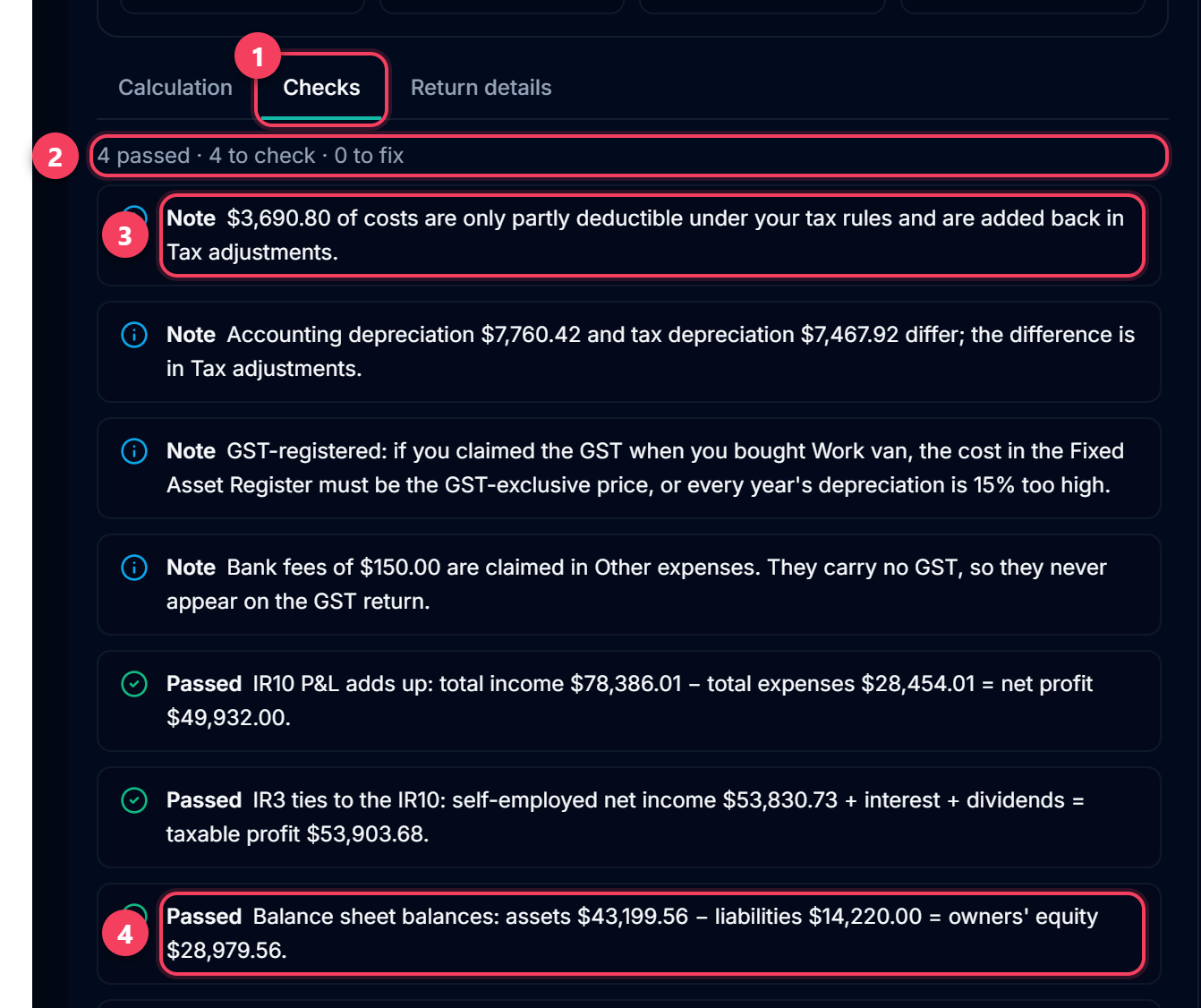
- The Checks tab. The badge counts the items to look at.
- The summary line: passed, to check, to fix.
- A note explains something unusual that is correct — here, the part of your costs that is private and is added back in Tax adjustments.
- A pass means one of IRD's own relationships holds, for example that the balance sheet balances.
Tip: Clear every "Fix" before filing. Click any check to jump to the boxes it is about.
8. Click any figure to see where it came from
Every figure on the return can be opened. It shows what the box is, how it was worked out, and the lines that add up to it. If something looks wrong, this is where you find out why.
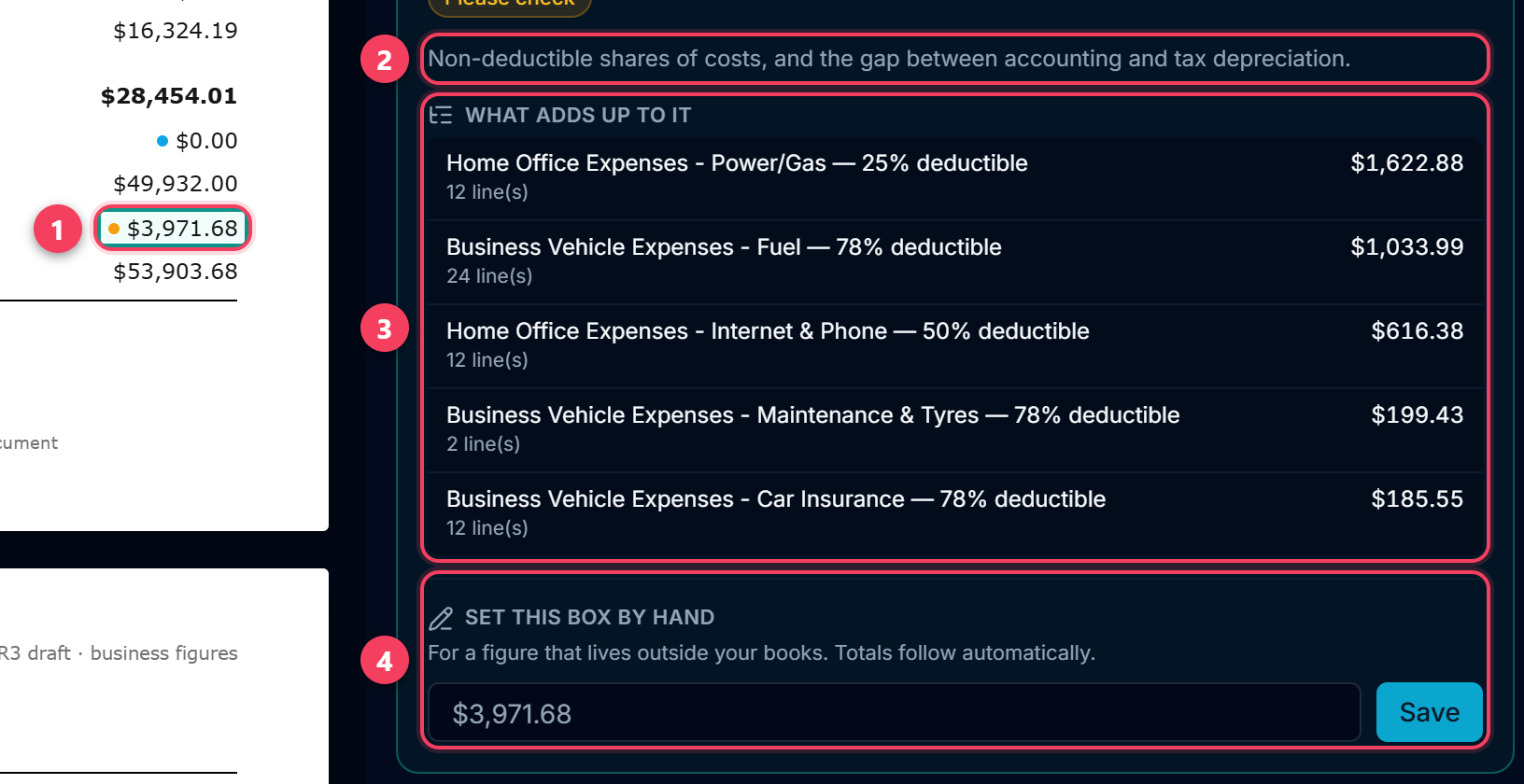
- Click a figure on the return. Here: Tax adjustments, the bridge from accounting profit to taxable profit.
- What the box is: the non-deductible shares of your costs, and the gap between accounting and tax depreciation.
- The lines that add up to it — the private share of the power bill, the vehicle costs at the logbook percentage, half the phone. Change a percentage in Tax Rules and these move.
- Set this box by hand, for a figure that lives outside your books, such as a loan balance from the lender's statement. Totals follow automatically and the box is marked purple on the return.
9. myIR page 1 — your details
From here on, each step is one page of the draft, in the order myIR asks for it. Key each figure into the box with the same name.
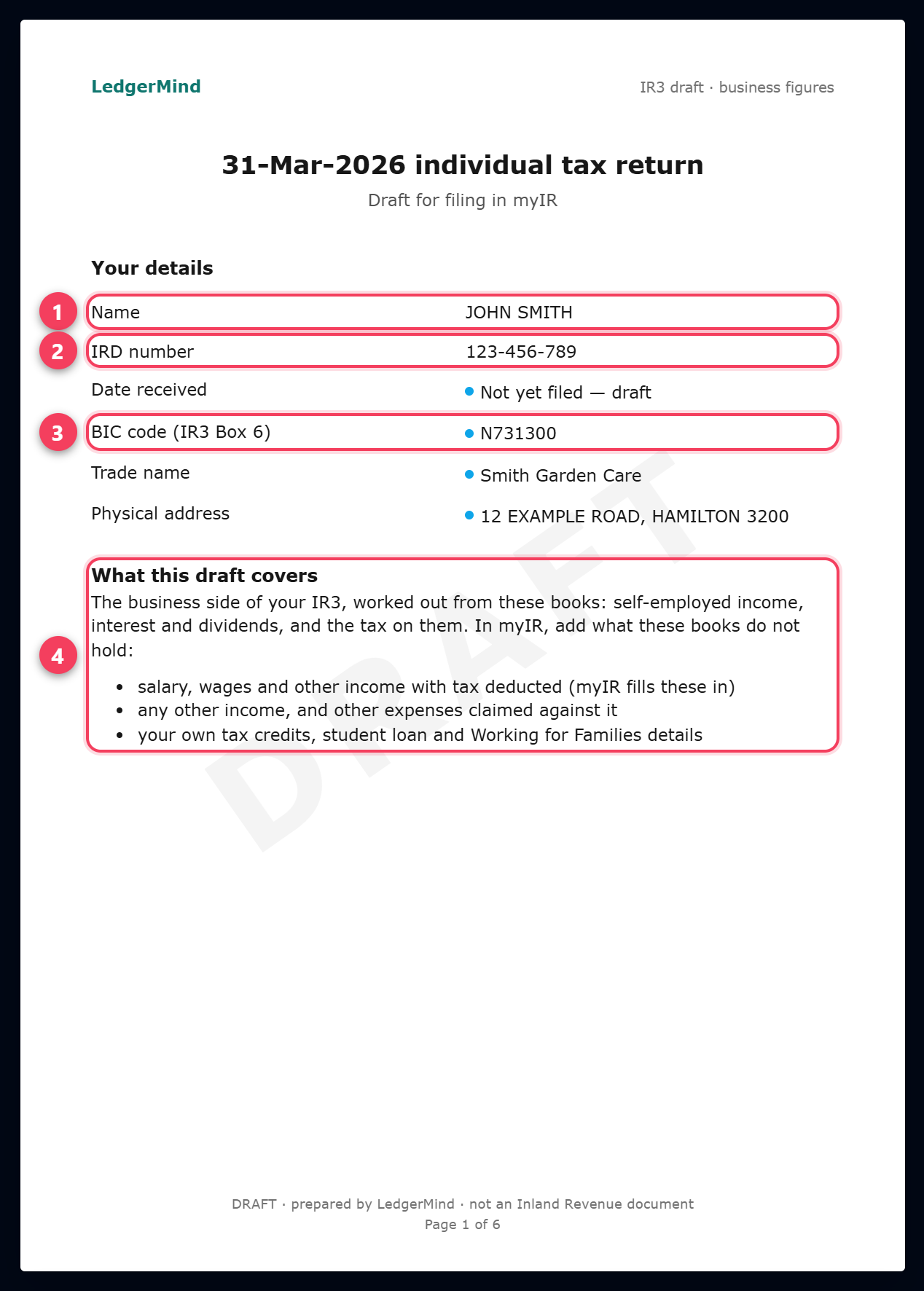
- Your name. An IR3 is a personal return, so it is filed in your name — the business name is the trade name below.
- Your IRD number, from Settings. myIR already knows it; check it matches.
- BIC code (IR3 Box 6), from Return details. The box numbers shown are the ones on the 2026 form; IRD moves them most years.
- What this draft does not cover, and you add in myIR: salary and wages (myIR fills those in itself), any other income and the expenses against it, and your own tax credits, student loan and Working for Families details.
10. myIR page 2 — income
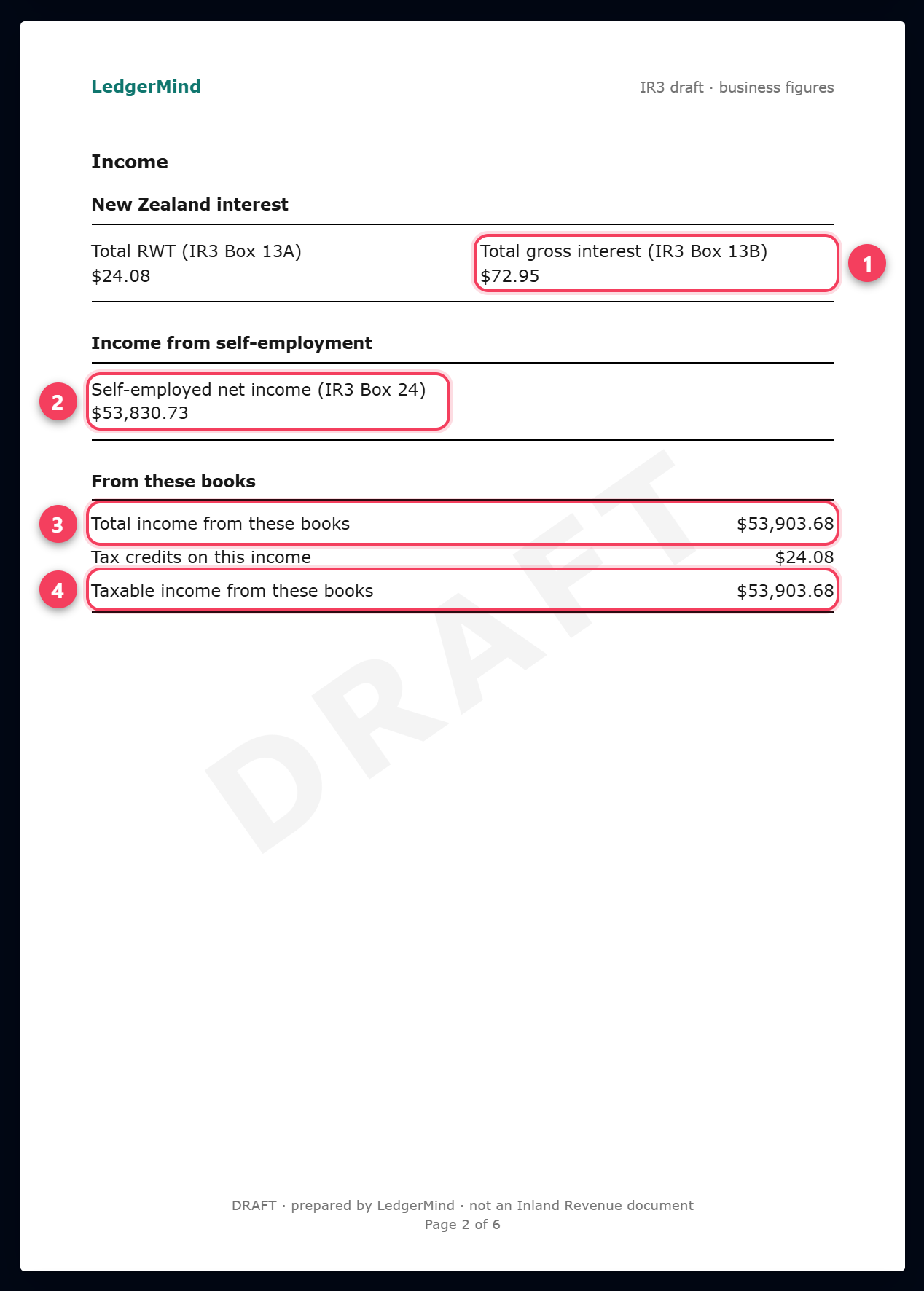
- New Zealand interest: the gross interest your bank paid and the RWT it took off. Check both against the bank's annual RWT certificate.
- Self-employed net income (IR3 Box 24): the taxable profit from the IR10 less interest and dividends, which are returned in their own boxes. This is not your sales figure.
- Total income from these books. myIR will show a bigger number once your wages and other income are in it.
- Taxable income from these books, after any losses brought forward are used.
11. myIR page 3 — tax calculation
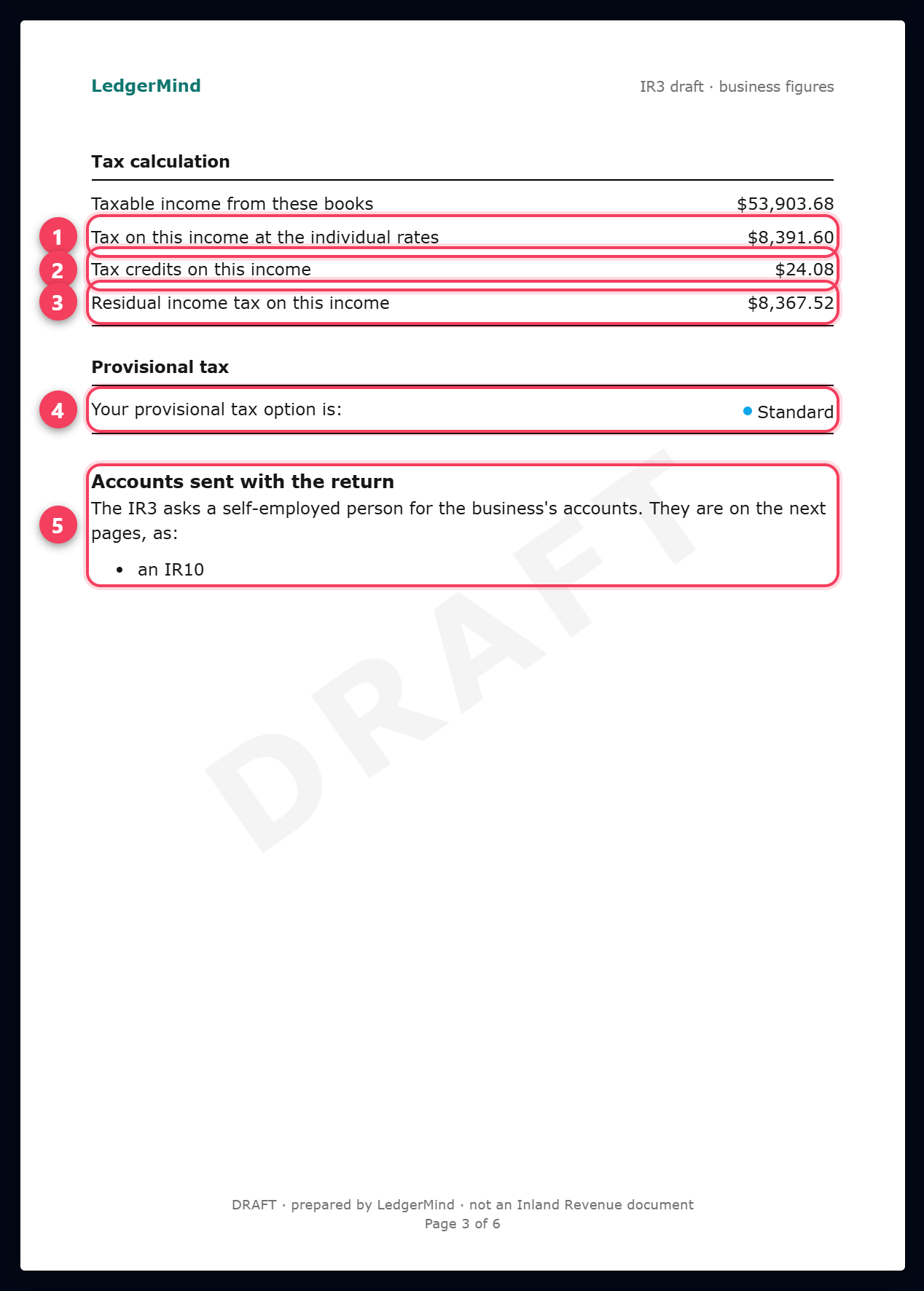
- The tax on this income at the individual rates, worked out band by band for the year being filed.
- Tax credits on this income: the RWT your bank withheld, plus anything you entered under Return details.
- Residual income tax: the tax less those credits. If it is over $5,000, you will be on provisional tax for next year — three instalments, usually 28 August, 15 January and 7 May.
- Your provisional tax option, as you set it under Return details.
- The IR3 asks a self-employed person for the business's accounts. They go in as an IR10, which is the next two pages.
12. myIR page 5 — profit and loss (IR10)
Page 4 of the draft is only a cover for the financial statements. Page 5 is the IR10 profit and loss.
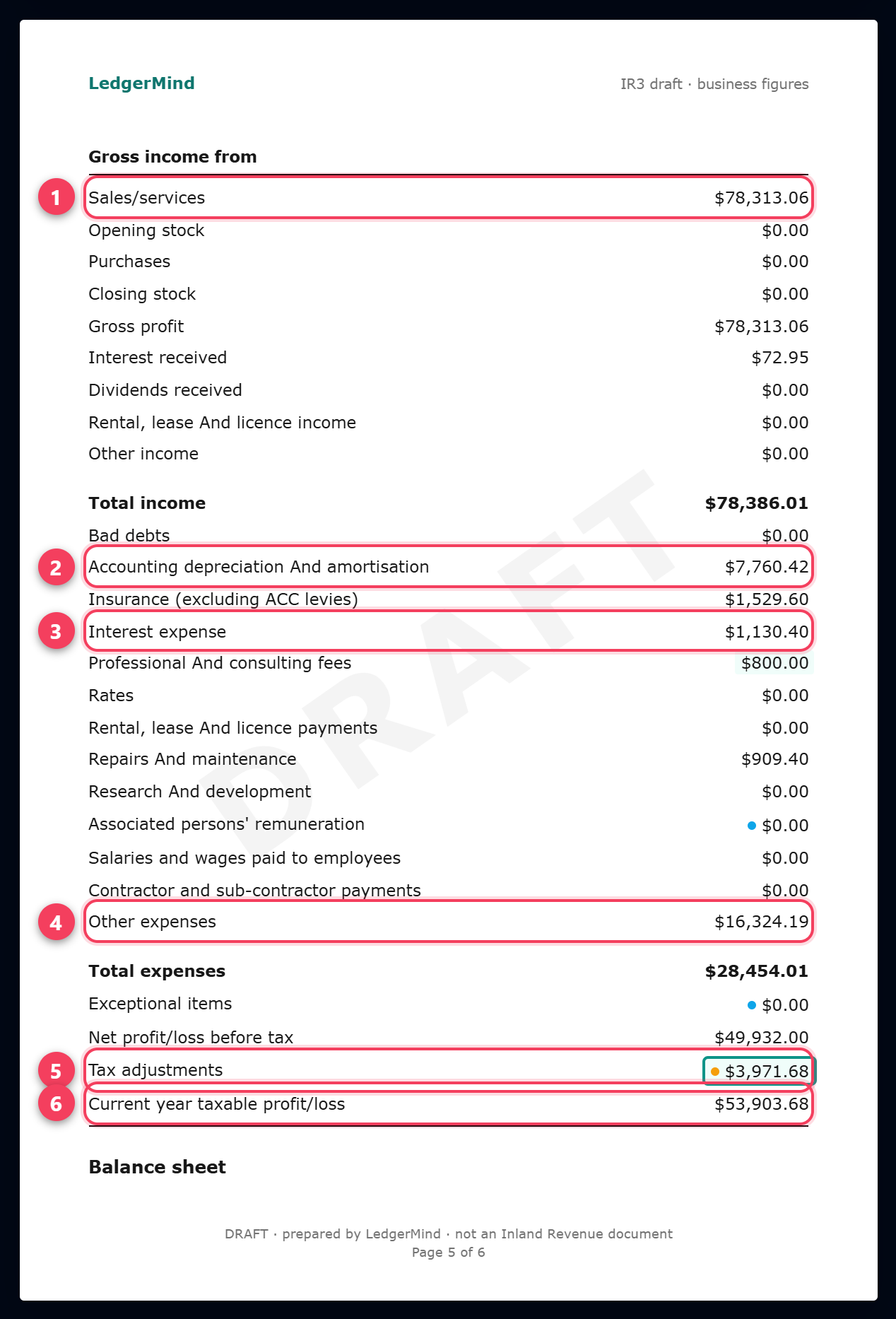
- Sales/services, excluding GST when you are GST-registered.
- Accounting depreciation, from the Fixed Asset Register.
- Interest expense: the interest part of a loan or overdraft, including a vehicle loan. Categorise the interest part of each repayment as Interest Expense and the principal as Loan Repayment, which is not an expense.
- Other expenses: every cost that has no box of its own on the IR10 — fuel, materials, phone, power, advertising, ACC levies.
- Tax adjustments: the bridge from accounting profit to taxable profit. With a home office, a vehicle you also drive privately, or an Investment Boost claim, it is never nil.
- Current year taxable profit = net profit + tax adjustments. This is the figure that feeds Box 24 on page 2.
13. myIR page 6 — balance sheet (IR10)
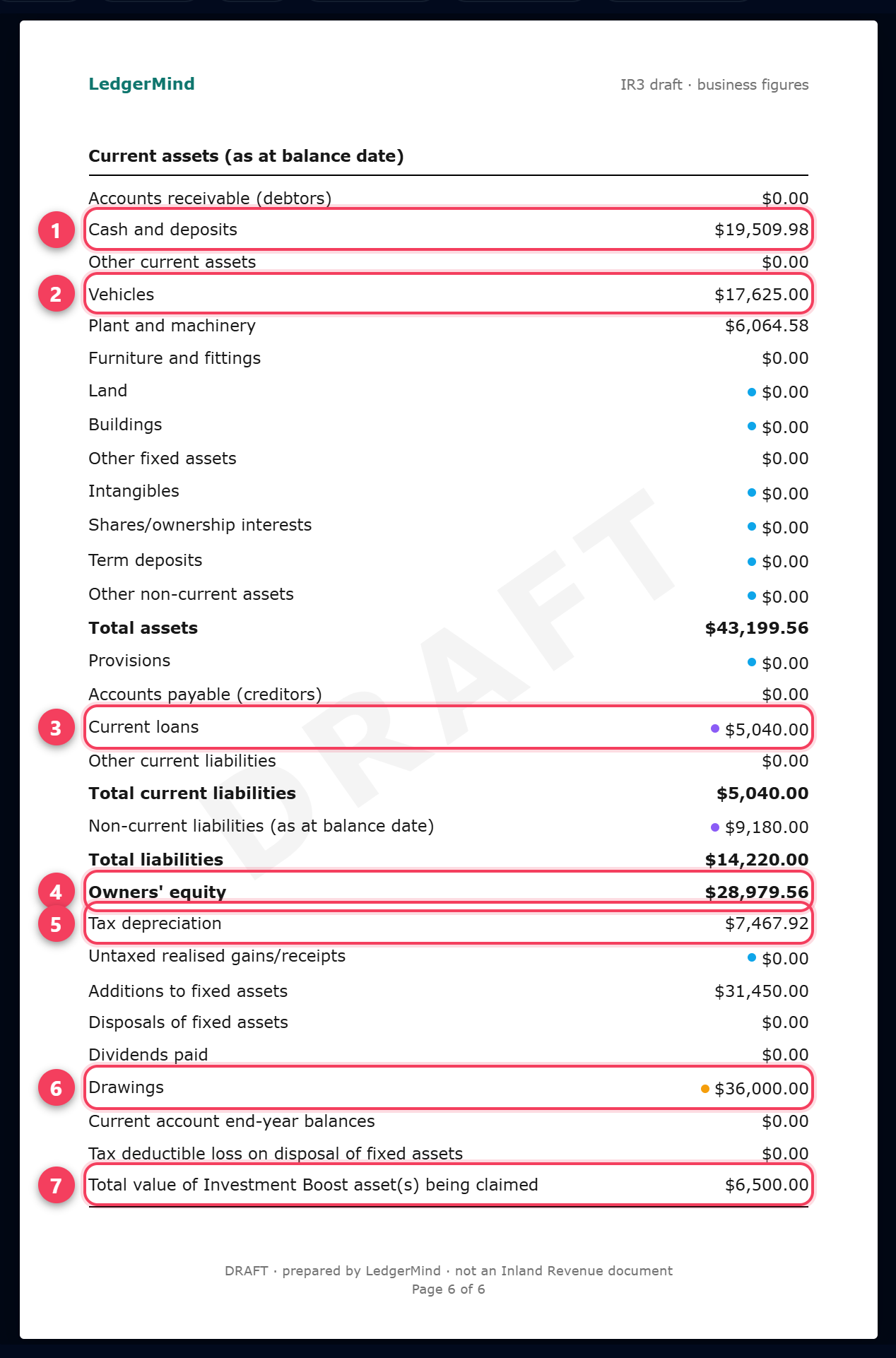
- Cash and deposits: the business bank balance at 31 March, read from your imported statements.
- Vehicles, and Plant and machinery below it: closing book values from the Fixed Asset Register.
- Current loans: the part of a vehicle or business loan due within 12 months. It is not in your bank feed, so take it from the lender's statement at 31 March and set it by hand — the purple dot means you did.
- Owners' equity = total assets less total liabilities. For a sole trader this is what the business owes you, not shares.
- Tax depreciation: the depreciation claimed for tax. It equals accounting depreciation plus the depreciation difference inside Tax adjustments.
- Drawings: the money you took out for yourself during the year. It is not an expense and it does not change your tax — you are taxed on the profit, not on what you drew.
- Investment Boost: the cost of the new assets the 20% is being claimed on.
Tip: If the two sides do not look right, open Checks: the balance-sheet check shows the assets, liabilities and equity it used.
14. Download the PDF, then key it into myIR
LedgerMind does not file for you and cannot send anything to IRD. The return is filed by you in myIR, or by your tax agent; this page is the figures, laid out the way myIR asks for them, and the record of where each one came from.
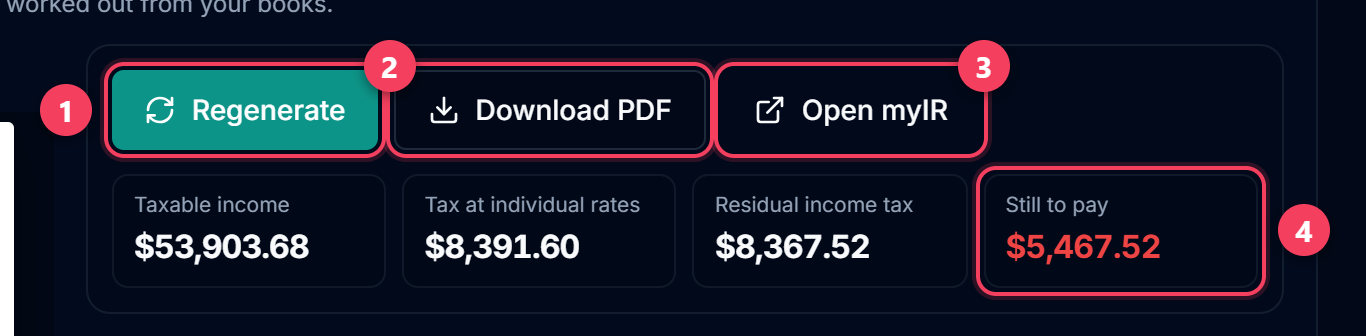
- Regenerate after any change to the books, a percentage or an asset. A banner warns you when the figures on screen are older than your books.
- Download PDF: all six pages, with the working behind every figure. Keep it with your records, or send it to your accountant.
- Open myIR, log in, and work through the return copying the figures across page by page.
- Still to pay. Terminal tax for the year is due on 7 February, or 7 April if you have a tax agent.
Tip: Found a mistake in a return you have already filed? Correct the books here, regenerate, and ask IRD to amend the return through myIR or your tax agent.
Common questions
Can I upload this PDF to IRD instead of typing the figures in?
No. IRD does not accept a return as a PDF from a business, and LedgerMind is not connected to IRD's filing gateway. The draft is laid out page for page like myIR so that keying it in takes a few minutes, and the PDF is your record of what you filed and how each figure was worked out. Your tax agent can file it for you from the same PDF.
Is the "still to pay" figure my final tax bill?
No — it is the tax on your business income alone. Your IR3 is a return of everything you earned in the year. In myIR you also have salary and wages (already filled in from the PAYE your employer reported), any other income, your own tax credits, your student loan and Working for Families. IRD adds your business profit to all of that and works out the final tax across the lot, which can push part of your income into a higher band. Treat the figure here as the business's share, and myIR's as the answer.
I have a job as well as the business. Does that change these figures?
It does not change the business figures — profit is profit — but it changes the tax on them. The rates are applied to your total income, so with $60,000 of wages your first dollar of business profit is already taxed at 30%, not 10.5%. The tax shown here starts the bands again at zero, so when you have other income it is lower than what you will actually pay. Keep some of the profit aside for that.
Where do the home office and vehicle percentages come from?
From Tax Rules, where each category carries the share of it that is deductible: the floor area of your home office, the logbook percentage for the vehicle, 50% for phone and internet. The full cost goes in the IR10 expense box, and the private share is added back under Tax adjustments, which is how IRD asks for it. Those percentages also decide how much GST you claim, so changing one changes both.
Why does the Dashboard profit differ from the taxable income here?
The Dashboard shows profit before tax adjustments: income less expenses as they left the bank. The Income Tax page then adds back the private shares and brings depreciation to the tax figure, which is what IRD taxes. The Income Tax page is the one to read before you file or set money aside.
Is GST part of this?
No. GST is filed separately on a GST101A every one, two or six months. When you are GST-registered, every figure on this page is GST-exclusive, because the GST was never yours. If you are not registered, the figures are the amounts as they left the bank, GST included — which is correct, since you could not claim it.
What about ACC levies?
ACC invoices you separately, after the IR3 is filed: IRD passes your self-employed income to ACC, and ACC bills the CoverPlus levy on it. The levy is not part of the return and is not deducted from the tax here. The levy invoices you have already paid are a deductible business cost — categorise them as ACC Levy and they land in Other expenses on the IR10.
What if the business made a loss?
The return shows a loss to carry forward instead of tax to pay, and next year it is already filled in under Return details. A loss can often be offset against your other income in the same year, which is done in myIR, not here — ask your accountant before you claim it, because a loss on a business that never makes money is the first thing IRD asks about.
My partner and I run the business together.
Then it is probably a partnership, which files its own return (an IR7) and gives each partner their share to put on their own IR3. LedgerMind prepares one business's figures as one person's, so use it for the partnership's books and split the profit outside it, with your accountant's help.
When do I have to start paying provisional tax?
When your residual income tax for a year is more than $5,000. From then on you pay next year's tax in three instalments through the year — usually 28 August, 15 January and 7 May — and the terminal tax for the year just gone is due on 7 February (7 April with a tax agent). Payments you make are read from the rows you categorise Income Tax Payments, and they show on this page as what you have already paid.