Filing your company income tax return (IR4) in myIR
Get the books right, generate the IR4, then key it into myIR box by box — every page of the return shown with the figures to copy and where each one comes from. Keep the PDF as your record, and check a return you have already filed.
Companies · 15 min read · Updated September 2026
1. Open the Income Tax tab and pick the year
A company files one IR4 for each income year, which ends on 31 March. The return is due on 7 July, or later if you have a tax agent. Everything in this guide happens on one page: Tax › Income Tax.
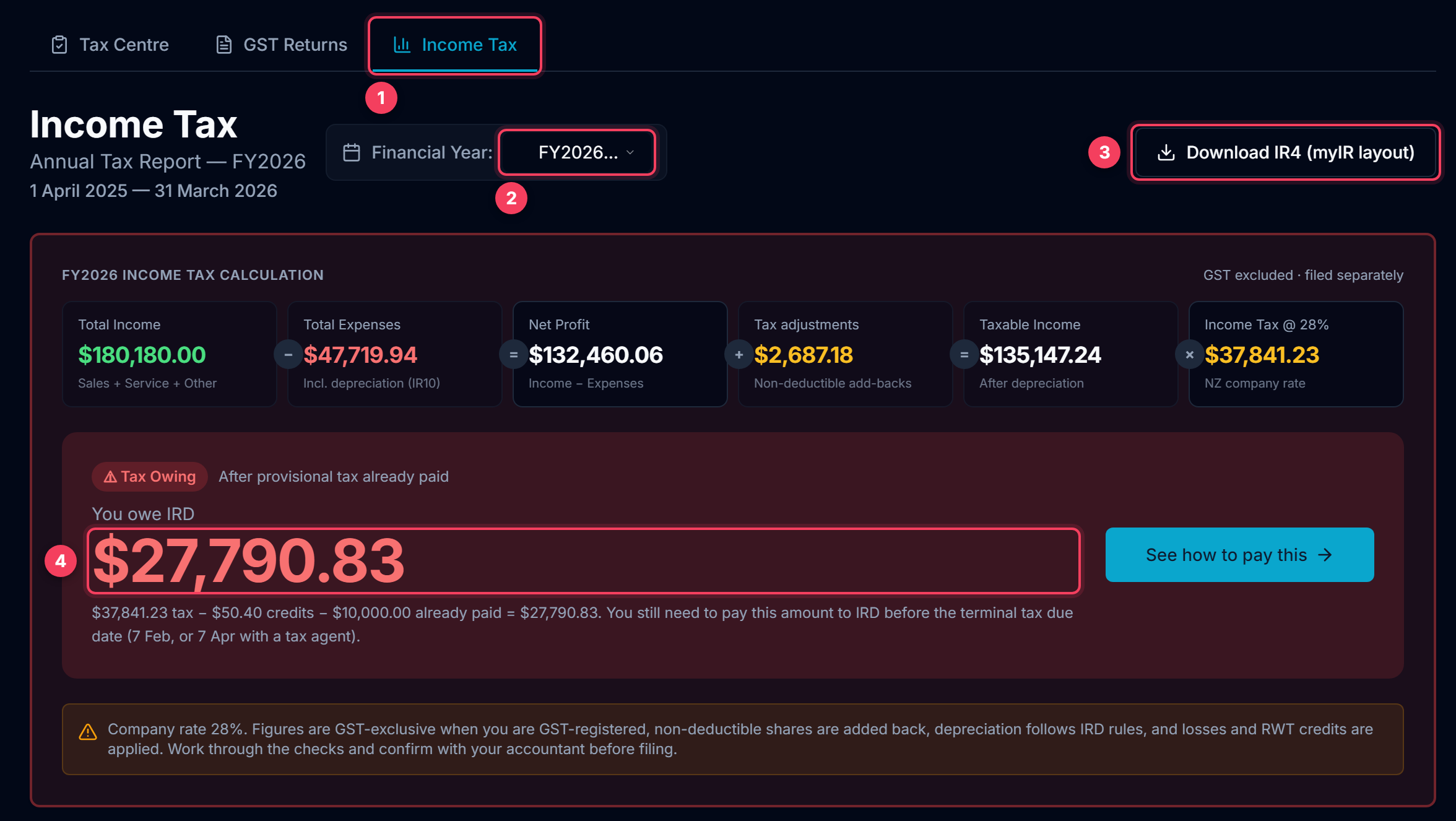
- Tax › Income Tax. Sole traders file an IR3 instead; the profit and loss figures are the same, the tax rates are not.
- The income year. FY2026 is 1 April 2025 to 31 March 2026. The page opens on the last year that has ended.
- Download IR4 (myIR layout) gives you the whole return as a PDF, page for page like myIR, with the working papers behind every figure.
- What is left to pay after the tax credits and the provisional tax you already paid. A negative figure is a refund.
Tip: The figures are only as good as the books. Do the next two steps before you generate anything.
2. Check the Fixed Asset Register first
Depreciation and the fixed-asset lines of the balance sheet come straight from Records › Fixed Assets. Most mistakes on a filed IR4 start here: an asset entered at the wrong cost, or an asset typed into myIR that was never in the register.
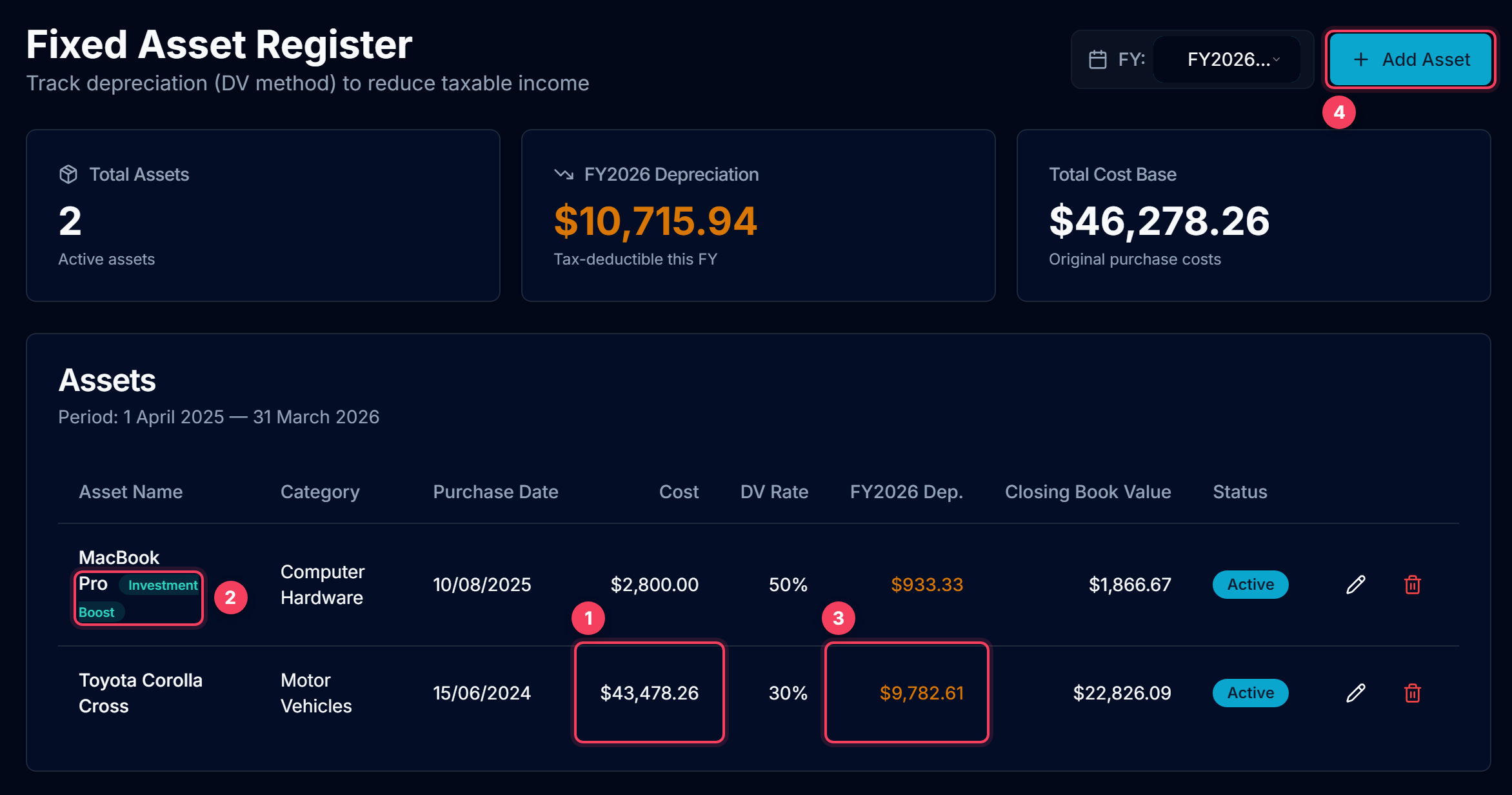
- Cost. If the company is GST-registered and claimed the GST when it bought the asset, enter the GST-exclusive price. A $50,000 car becomes $43,478.26. Entering the GST-inclusive price overstates the depreciation by 15% every year.
- Investment Boost. A new asset first used on or after 22 May 2025 can have 20% of its cost deducted for tax in the year you buy it. Tick it on the asset and the return claims it.
- This year's depreciation, worked out by IRD's diminishing-value method. It lands on the IR10 as "Accounting depreciation" and "Tax depreciation".
- Add every asset the company owns and uses: vehicles, computers, tools, furniture. Anything not listed here shows as $0 on the return, which is correct if the company does not own it.
Tip: A bank line that paid for an asset is categorised Fixed Asset Purchase: the cost is claimed through depreciation, so it is not an expense as well. Only put an asset in myIR if it is in the register. A round number like "Plant $30,000" with no depreciation behind it is exactly what a lender or IRD will question.
3. Fill in the Return details
A few things on the IR4 are not in your bank statements. Enter them once under Return details. Next year they carry forward on their own.
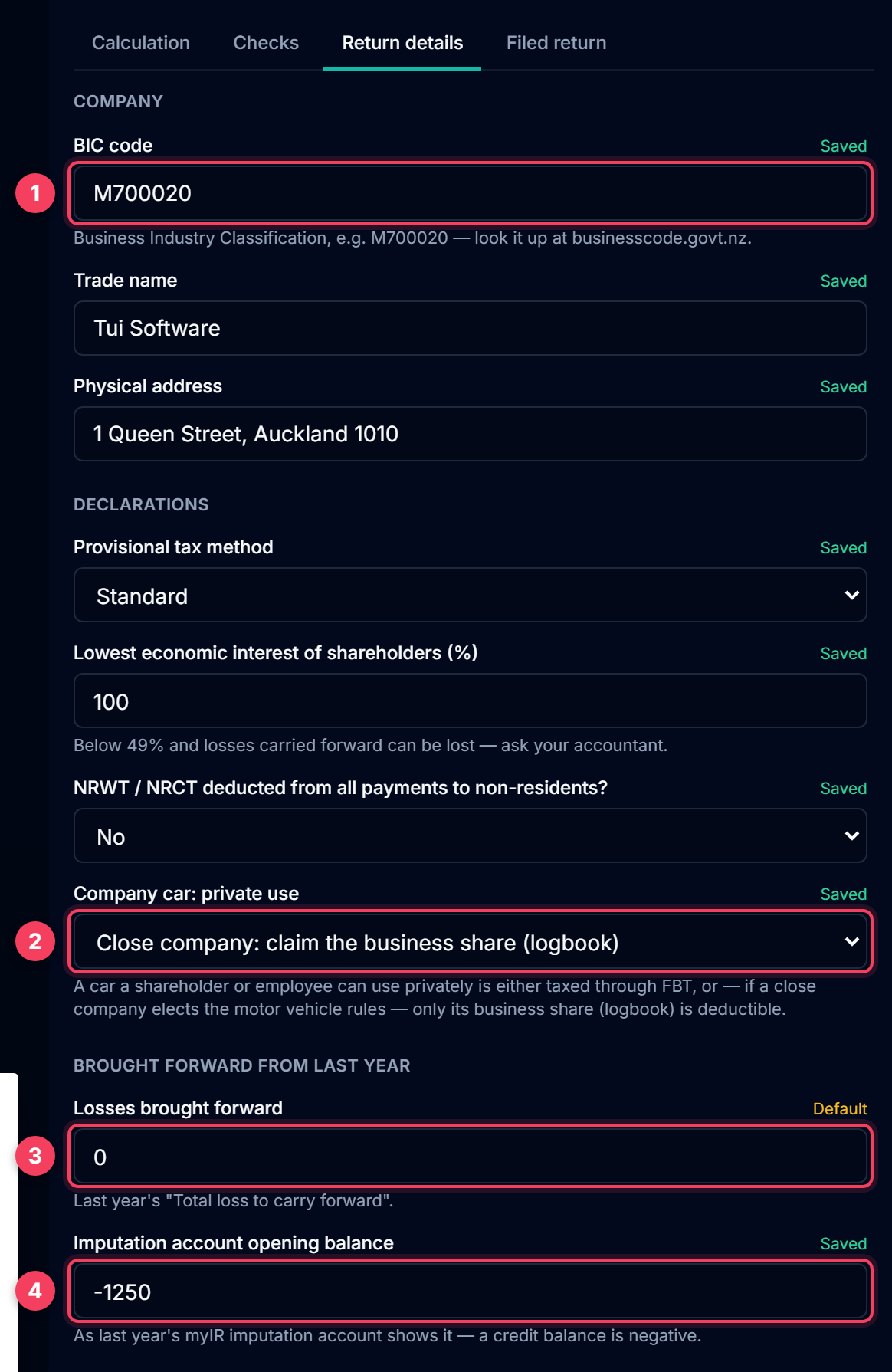
- BIC code: the Business Industry Classification code IRD holds for the company, for example M700020. Look it up at businesscode.govt.nz.
- Company car: private use. If a shareholder or employee can use the company car privately, choose between FBT and claiming only the business share from a logbook. See the questions at the end of this guide.
- Losses brought forward: last year's "Total loss to carry forward". If you generated or uploaded last year's return, this is already filled in.
- Imputation account opening balance, exactly as last year's myIR imputation account shows it. A credit balance is a negative number, for example -1,250.00.
Tip: Press Save details at the bottom of the form. The return recalculates straight away.
4. Generate the return
Press Generate IR4 return. LedgerMind works through your books in 13 steps and fills in the matching boxes on the left as it goes, so you can see where each figure lands.
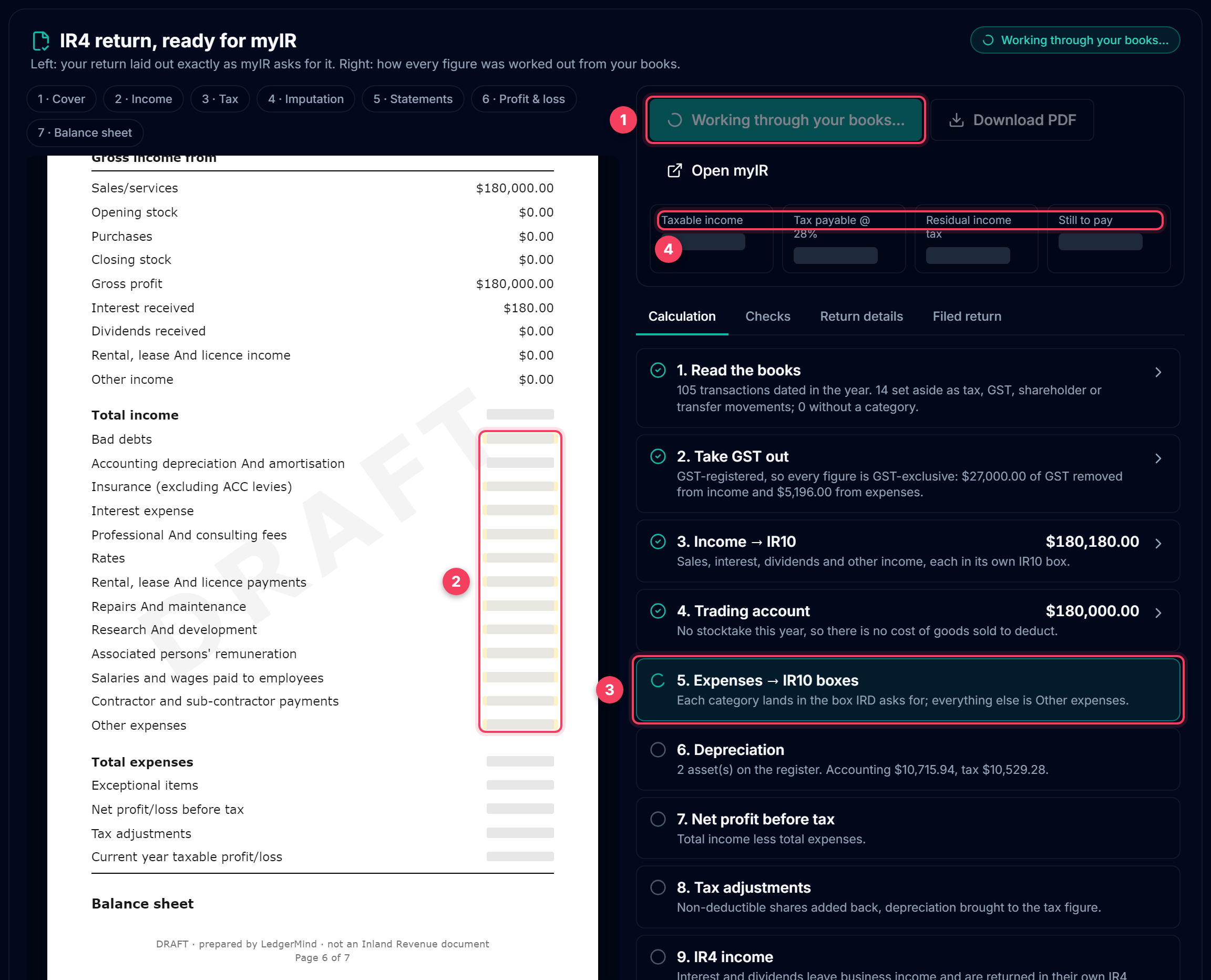
- Generate. It keeps a copy of this version; next year's opening figures (losses, imputation balance) come from it.
- Boxes being filled in right now glow on the return.
- The step being worked on. Every step can be expanded afterwards to show the lines behind it.
- The headline figures appear when the tax step is done: taxable income, tax at 28%, residual income tax, and what is still to pay.
5. Work through the checks
Before you file, open Checks. It re-runs the arithmetic myIR enforces and points out anything in the books worth a second look.
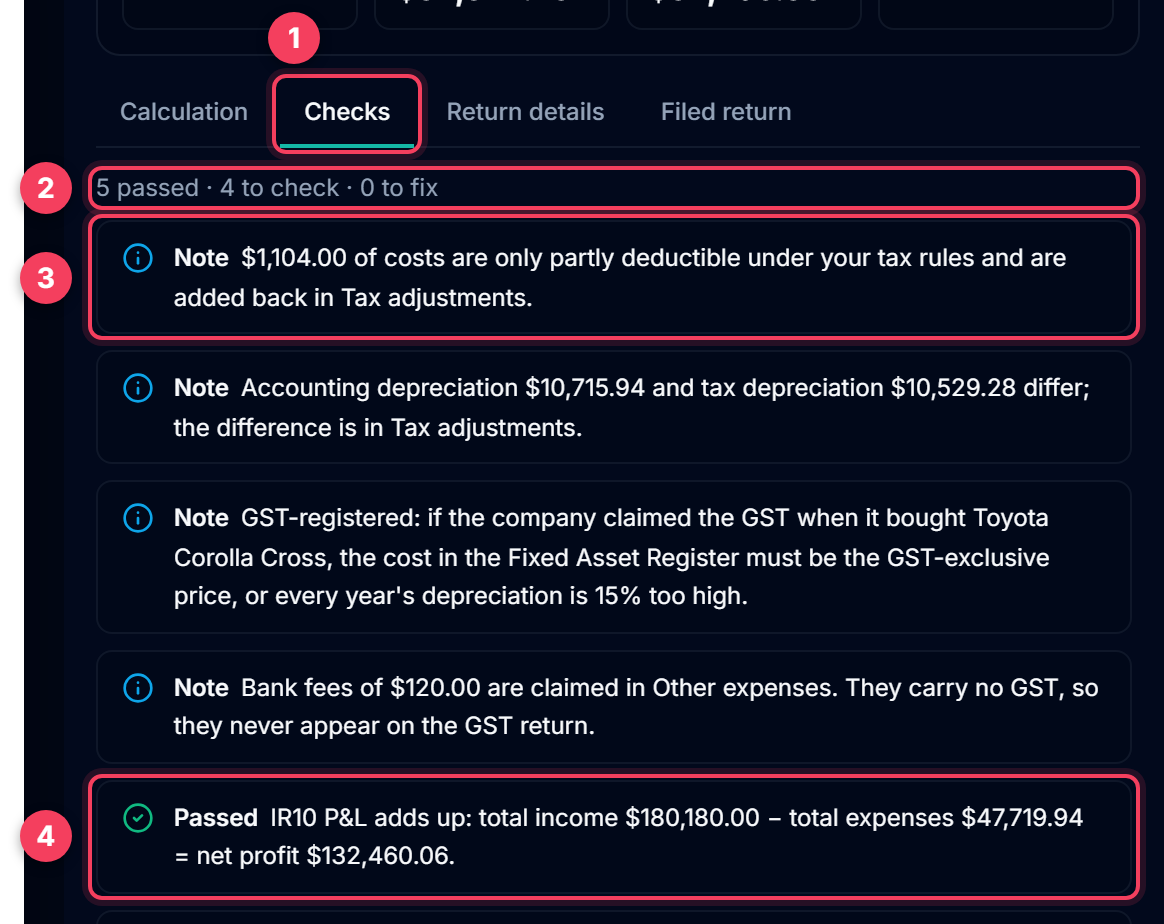
- The Checks tab. The badge counts the items you need to look at.
- The summary line: passed, to check, to fix.
- A note explains something unusual that is correct, for example why tax adjustments are not nil.
- A pass means one of IRD's own relationships holds, for example total income less total expenses equals net profit.
Tip: Clear every "Fix" before filing. Click any check to see the boxes it is about.
6. Click any figure to see where it came from
Every figure on the return can be opened. It shows where the number came from and the lines that add up to it. If something looks wrong, this is where you find out why.
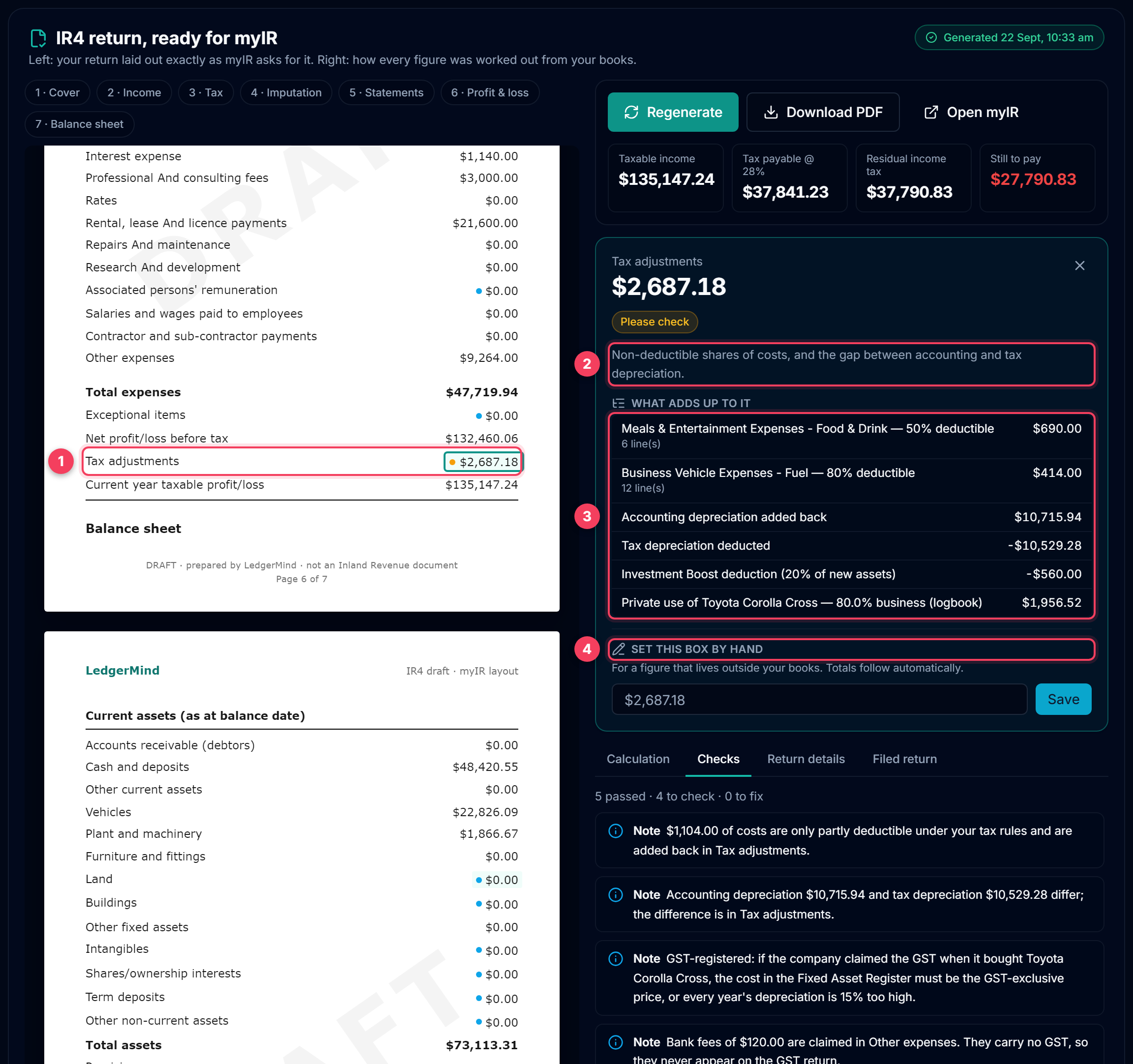
- Click a figure on the return. Here: Tax adjustments.
- What the box is and how it is worked out.
- The lines that add up to it. Here: the 50% of entertainment that is not deductible, the private share of the fuel and of the car's depreciation, and the Investment Boost deduction.
- Set this box by hand, for a figure that lives outside your books, such as a loan balance from the lender's statement. Totals follow automatically, and the box is marked purple.
7. myIR page 1 — company information
From here on, each step is one page of the return in the order myIR shows it, with the same labels. Key each figure into the box with the same name in myIR.
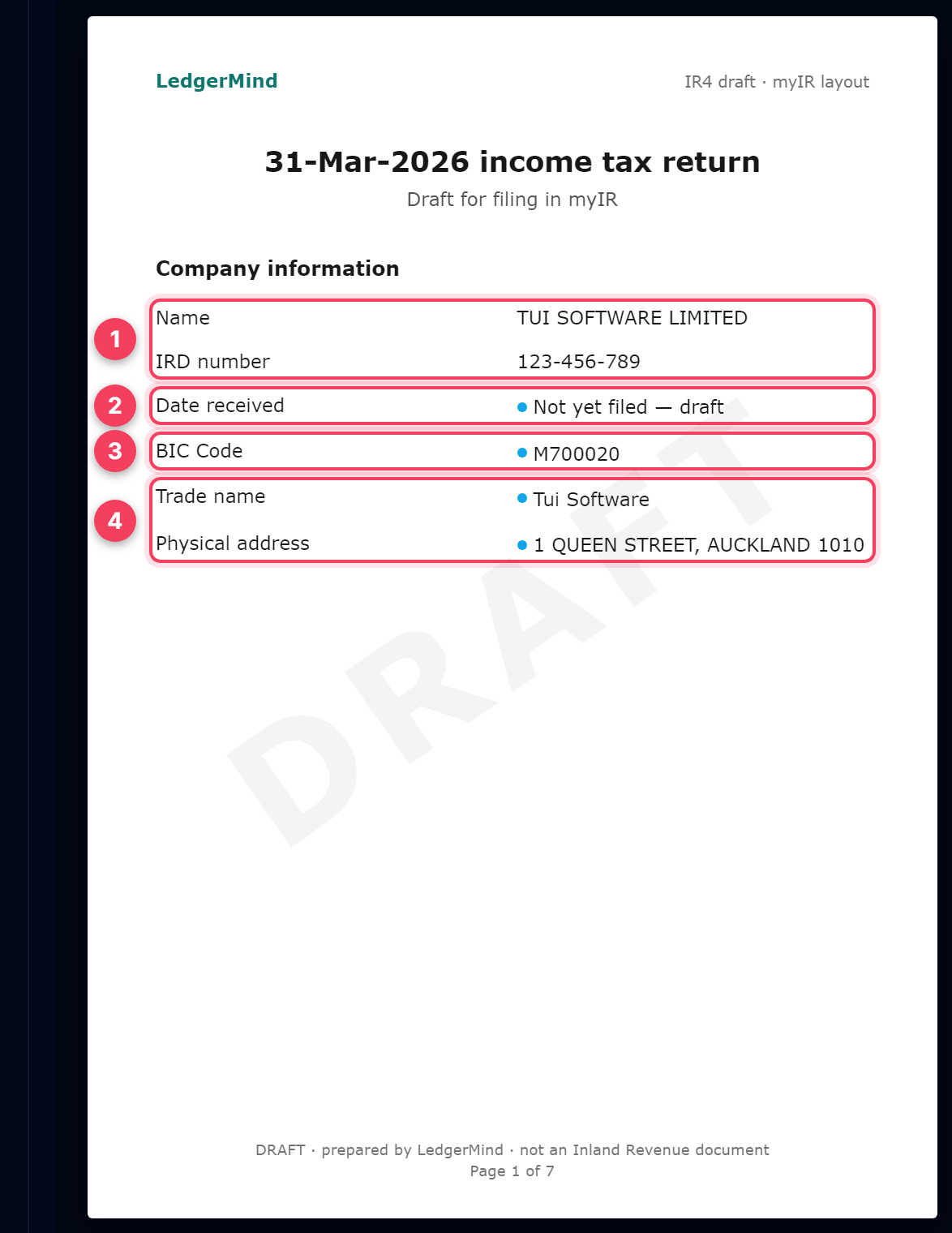
- Name and IRD number come from Settings. myIR already knows them; check they match.
- Date received stays blank until IRD has the return.
- BIC code, from Return details.
- Trade name and physical address, from Return details.
8. myIR page 2 — income
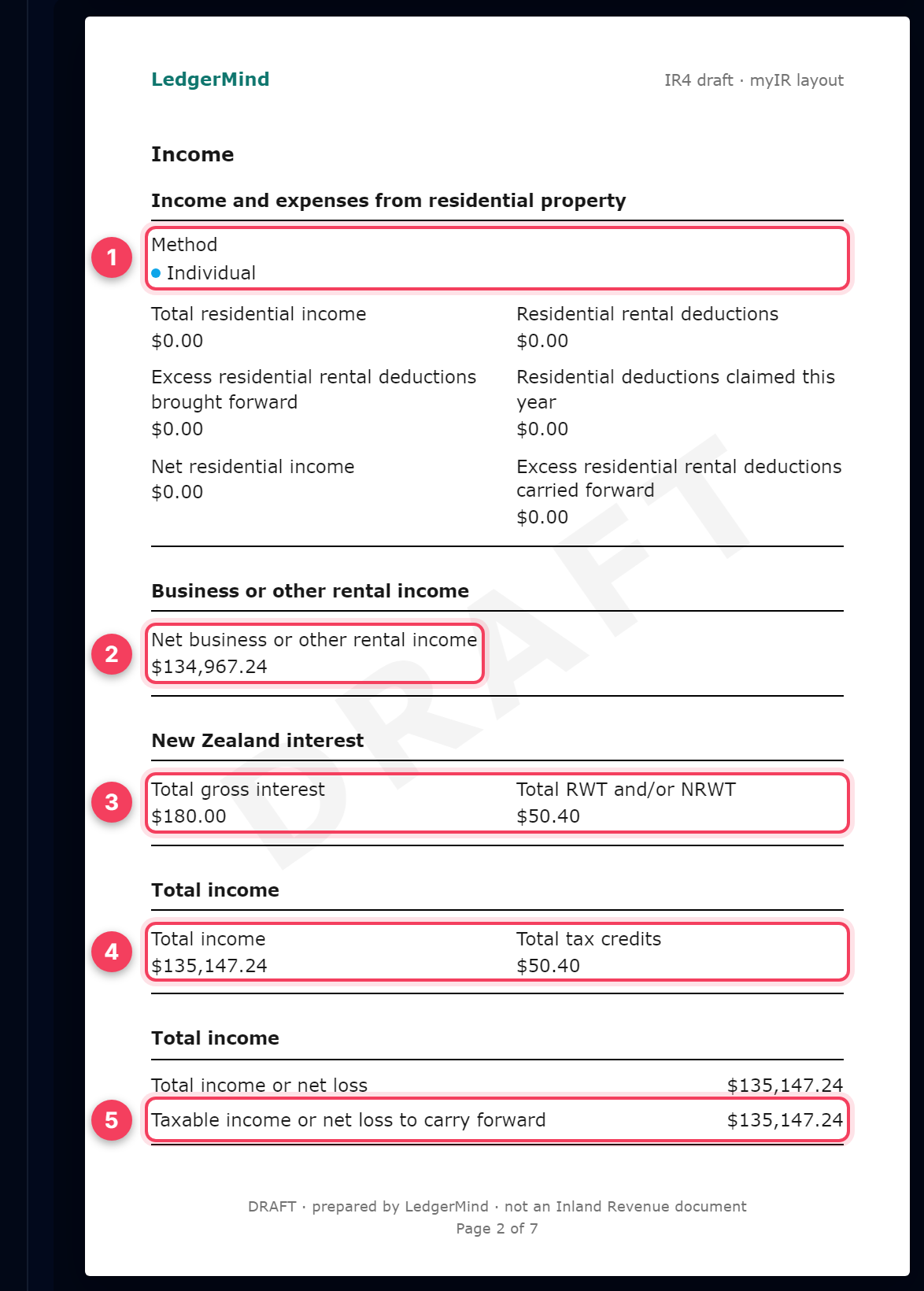
- Residential property. Leave the method as Individual and the figures at $0.00 unless the company rents out residential property.
- Net business or other rental income: the IR10 taxable profit less interest and dividends, which are returned in their own boxes. Do not put your sales figure here.
- Total gross interest and the RWT the bank took off it. Check both against the bank's annual RWT certificate.
- Total income and total tax credits. myIR works these out too; they should agree.
- Taxable income or net loss to carry forward. A loss is shown with a minus sign.
9. myIR page 3 — tax calculation and declarations
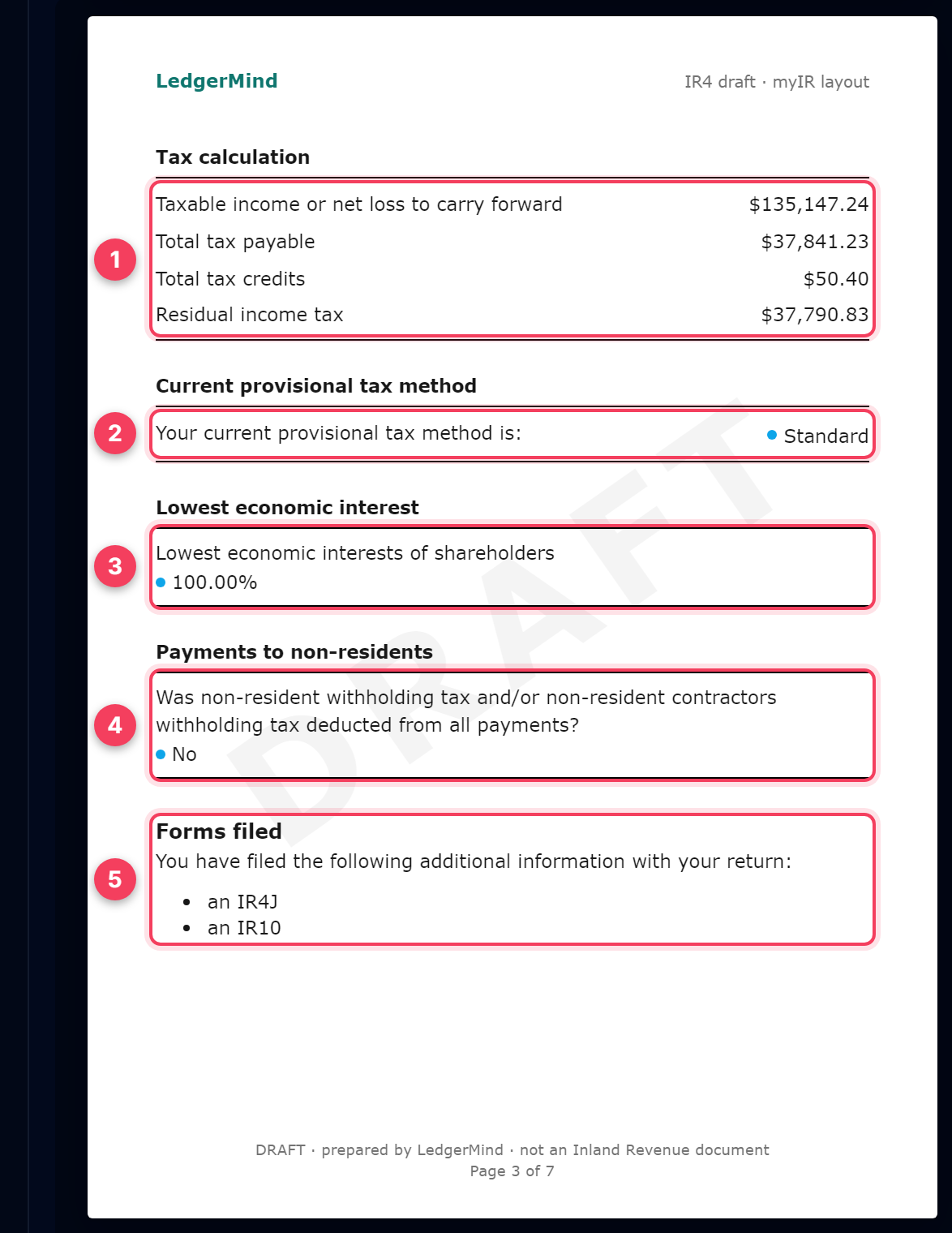
- Tax calculation. Total tax payable is 28% of taxable income, and residual income tax is that less your tax credits. With a loss, the loss to carry forward appears here in whole dollars.
- Your provisional tax method. Most small companies are on Standard.
- Lowest economic interest of shareholders: 100% if the same people have owned the company all year.
- Payments to non-residents. Answer for the company.
- Forms filed: the IR4J imputation account and the IR10 financial statements go in with the return.
10. myIR page 4 — imputation account (IR4J)
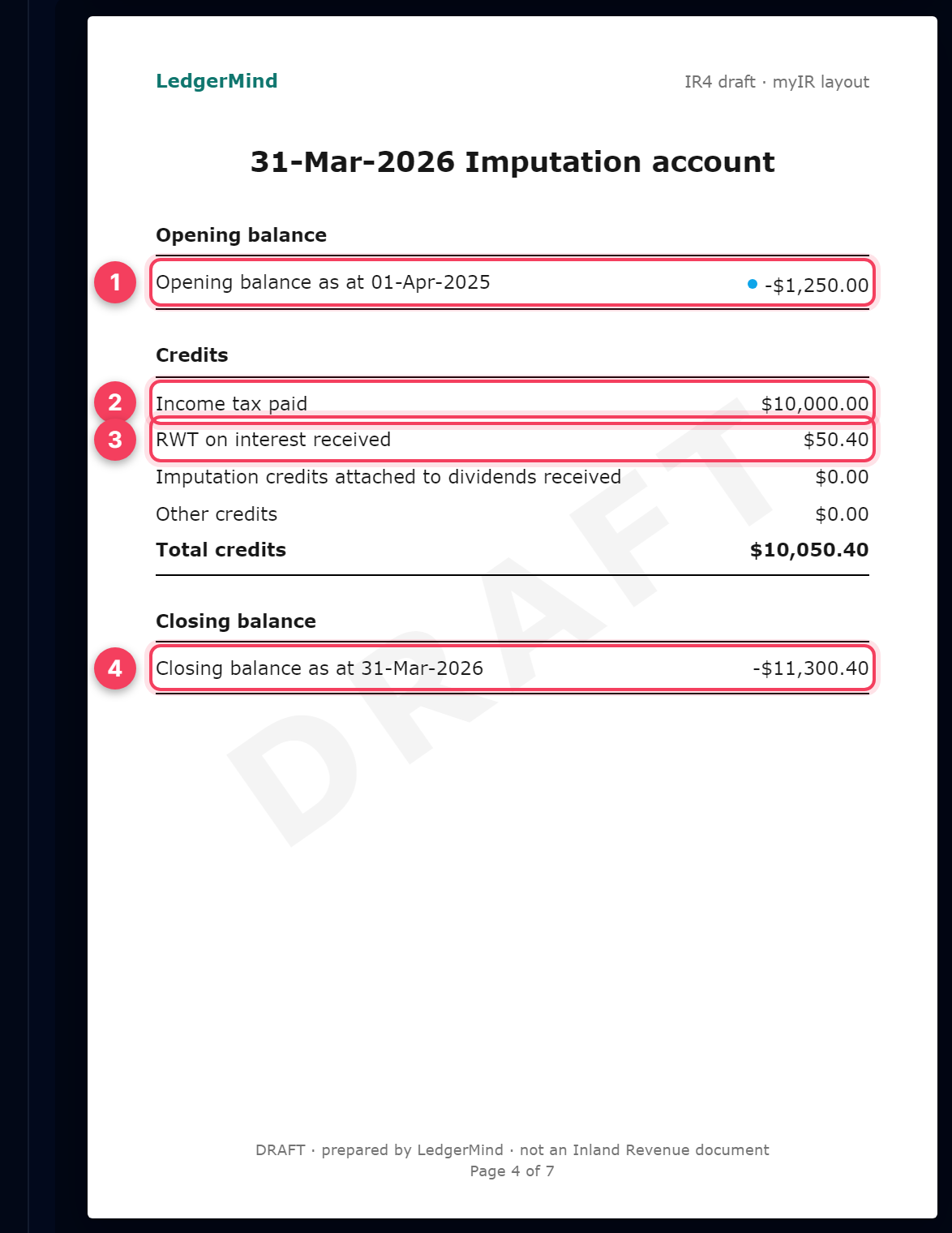
- Opening balance at 1 April: last year's closing balance. myIR prints a credit balance as a negative number.
- Income tax paid: the provisional and terminal tax the company paid IRD during the year. It is read from payments categorised Income Tax Payments.
- RWT on interest received: the same figure as on page 2.
- Closing balance: opening less credits plus debits. A credit balance is negative, and that is normal. A positive (debit) balance at 31 March means further income tax is payable.
11. myIR page 6 — profit and loss (IR10)
Page 5 of the return is only a cover for the financial statements. Page 6 is the IR10 profit and loss.
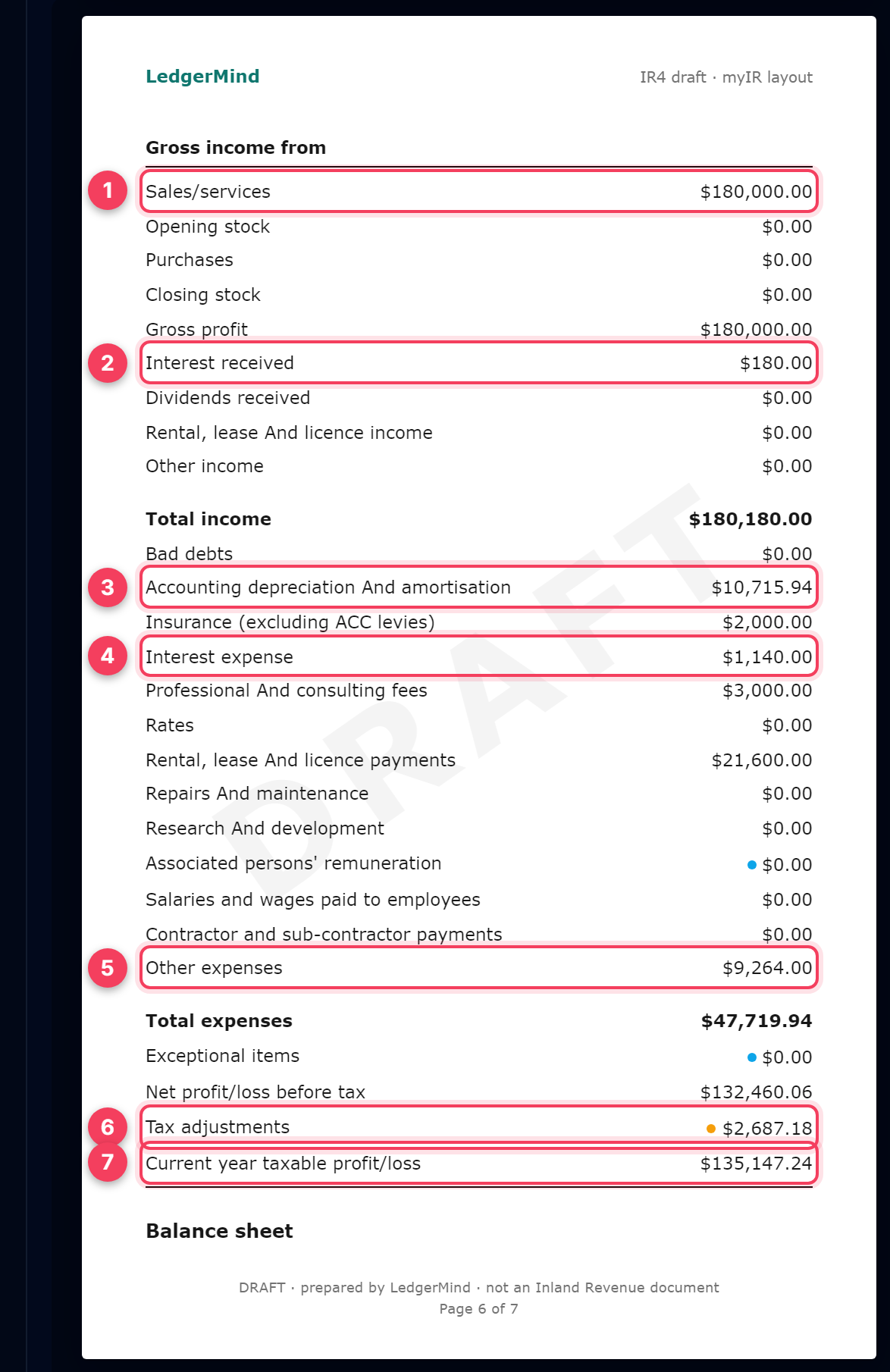
- Sales/services, excluding GST when the company is GST-registered.
- Interest received, before RWT.
- Accounting depreciation, from the Fixed Asset Register.
- Interest expense: interest on loans, including a car loan. Categorise the interest part of each repayment as Interest Expense and the rest as Loan Repayment.
- Other expenses: every cost that has no box of its own.
- Tax adjustments: the bridge from accounting profit to taxable profit (non-deductible shares, private use, depreciation differences). It is not nil whenever those exist.
- Current year taxable profit/loss = net profit + tax adjustments.
12. myIR page 7 — balance sheet (IR10)
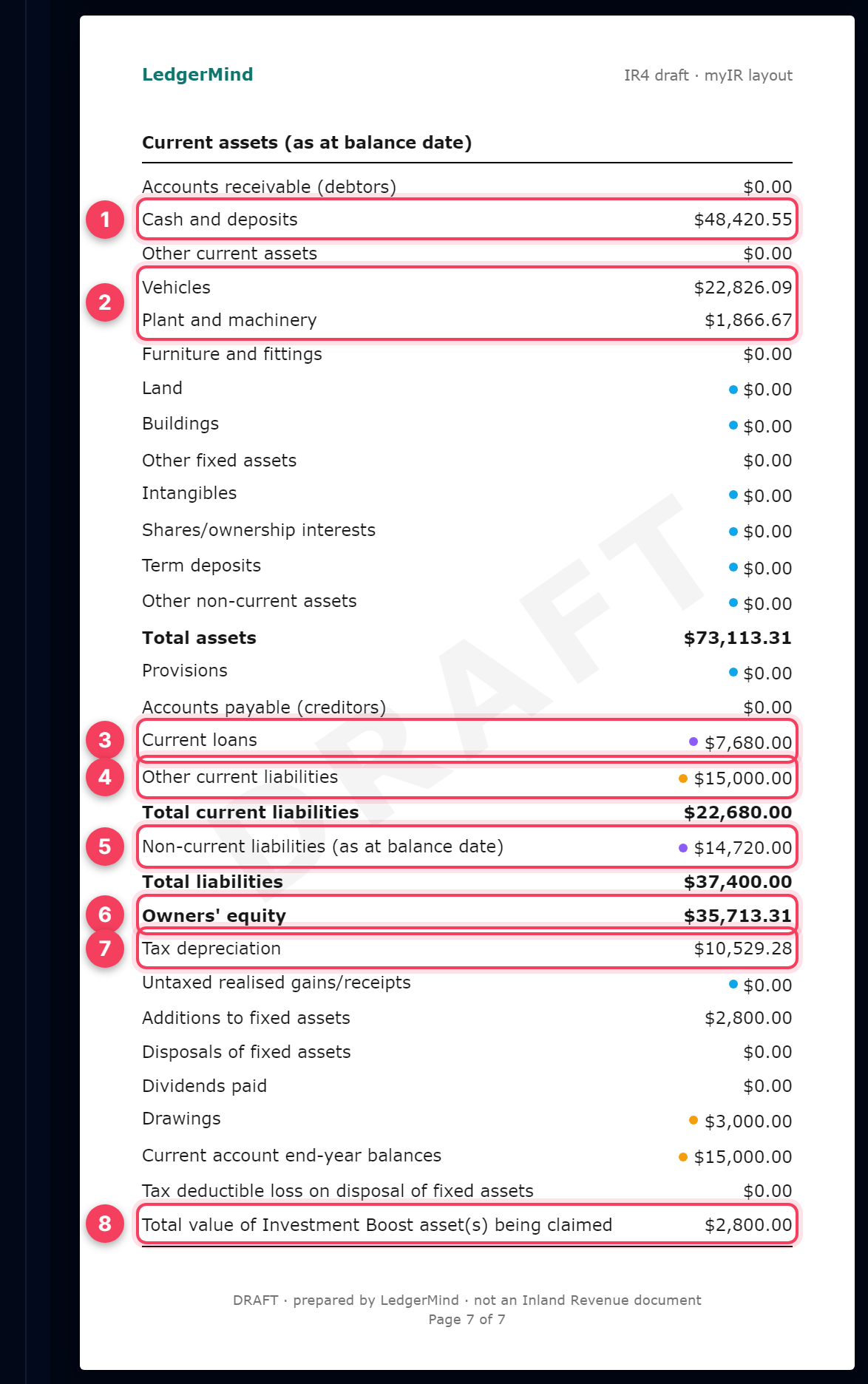
- Cash and deposits: closing bank balances at 31 March.
- Vehicles and Plant and machinery: closing book values from the Fixed Asset Register. Plant and machinery covers equipment such as computers, servers and tools. Leave it at $0.00 if the register has none.
- Current loans: the part of the car or business loan due within 12 months. Take it from the lender's statement at 31 March and set it by hand.
- Other current liabilities: here, the money the shareholder put into the company (Shareholder Loan – Advance). The company owes it back.
- Non-current liabilities: the rest of the loan, due after 12 months.
- Owners' equity = total assets less total liabilities. myIR expects the two sides to balance.
- Tax depreciation: the depreciation claimed for tax. It must agree with accounting depreciation plus the depreciation difference in Tax adjustments.
- Investment Boost: the cost of the new assets the 20% is claimed on.
Tip: Download the PDF when you are done and keep it with your records: it is your copy of every figure you keyed in, with the working behind it.
13. After filing: check what you filed
Once the return is in, myIR offers a "Submission confirmation" PDF. Upload it here and every figure is compared with the return LedgerMind prepared. IRD's own arithmetic is also re-run on what was filed, which catches an inconsistent return even when nothing matches.
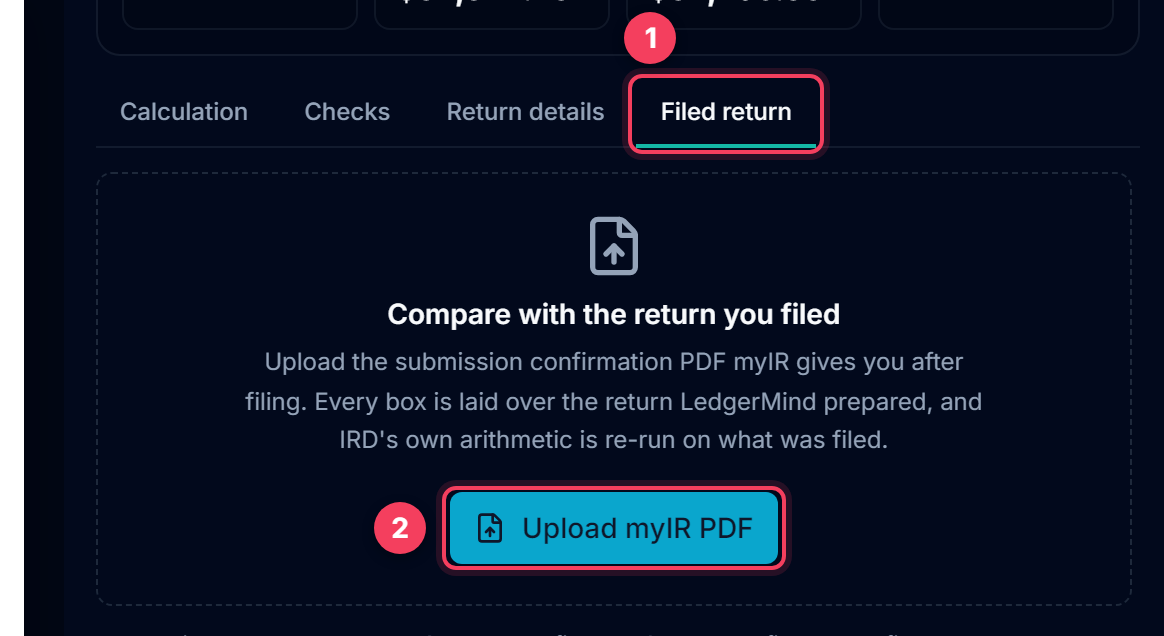
- Filed return tab.
- Upload the confirmation PDF. The income year is read from the PDF itself. A return for a different IRD number is refused, and next year's losses and imputation balance start from what was actually filed.
Tip: Found a mistake in a return already filed? Correct the books here, regenerate, and ask IRD to amend the return, through myIR or your tax agent. If the same mistake runs through earlier years (a car entered at its GST-inclusive cost, say), those years need correcting too.
Common questions
What is "Plant and machinery"?
Equipment the company owns and depreciates: computers, servers, tools, machines, office equipment. Vehicles and furniture have their own boxes. Fill it only from the Fixed Asset Register. If the register has nothing in that class, the right answer is $0.00, never an estimate.
The company car is also used privately. FBT, or claim the business share?
There are two lawful ways, and you choose one under Return details. (1) The company pays fringe benefit tax on the private use and claims the car in full. (2) A close company can elect the motor vehicle rules instead: no FBT, but only the business share measured by a logbook (a 90-day test period) is deductible, and LedgerMind adds the private share back in Tax adjustments. FBT on a car is charged for every day it is available for private use (a car kept at home usually counts), not on the share of kilometres actually driven privately, so for a small company it often costs more than the deduction option 2 gives up. Ask your accountant before choosing. FBT is filed separately in myIR and is not part of the IR4.
We bought the car with GST included. What cost goes in the register?
If the company is GST-registered and claimed the GST on the purchase, the GST-exclusive price. If it could not claim the GST (not registered at the time, or it was not claimed), the full price.
Where do the car loan and the money I put in go?
Car loan: categorise the interest part of each repayment as Interest Expense (IR10 Interest expense) and the principal as Loan Repayment, which is not an expense. The balance owing at 31 March is a liability: set Current loans (due within a year) and Non-current liabilities (the rest) from the lender's statement. Your own money: record it as Shareholder Loan – Advance, including money you paid the dealer directly from your personal account. It appears under Other current liabilities and Current account end-year balances, because the company owes it back to you.
Why does the imputation account show a negative balance?
That is how myIR prints a credit balance, which is the normal state. It builds up from income tax paid and RWT. A positive (debit) balance at 31 March is the one to worry about.
Can I send the PDF to IRD instead of keying the figures in?
No. It is a draft prepared by LedgerMind, laid out like myIR so you can key the return in quickly and keep a record. The return itself is filed in myIR, by you or your tax agent.