Importing goods: Customs GST, duty and freight done properly
For businesses that buy from overseas: the categories that carry the right GST treatment, how to split one Customs or courier payment into GST, duty and fees, and what the GST return does with each line.
Everyone · 12 min read · Updated August 2026
1. Categories that know their GST
Most expenses have 15% GST inside the amount, so the app claims 3/23 of them. Imports are the exception, and getting it wrong over-claims. Settings › Tax Rules now has seven import and export categories, and each carries its own GST treatment: an overseas supplier's invoice has no NZ GST in it, duty has none, international freight and export sales are zero-rated, and the GST line on a Customs invoice is nothing but GST.
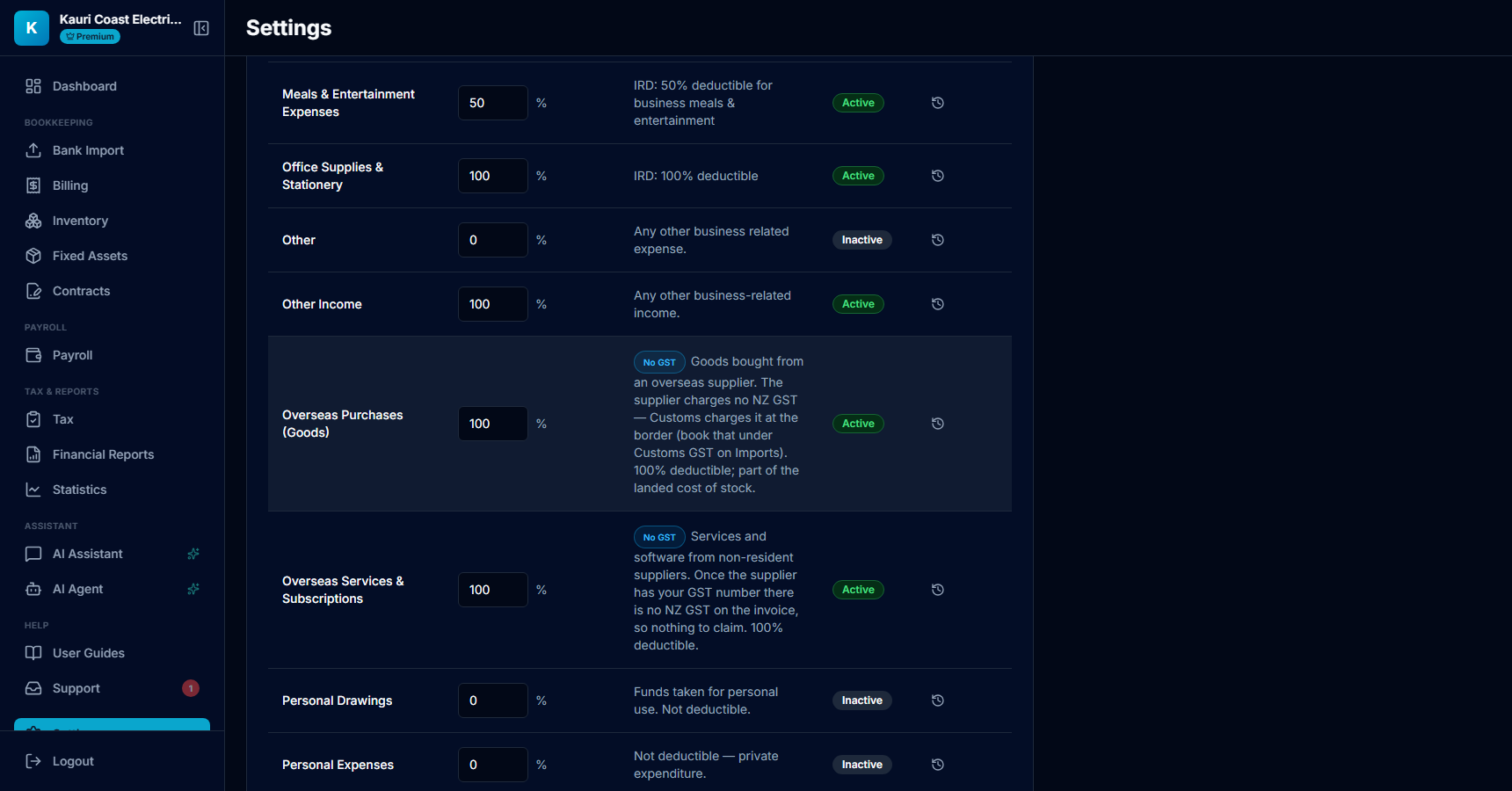
- The blue badge is the treatment: No GST, Zero-rated or GST only. A category without a badge is the usual 15%-inside.
- The Claimable % still governs income tax deductibility — 100% for all of the import categories.
- Your own categories can be given a treatment too: Add Category, then choose the GST treatment under the claimable percentage.
Tip: Give overseas suppliers your GST number. A non-resident that has it should not charge NZ GST on services or on low-value goods, and there is nothing to claim on an invoice that has no GST in it.
2. Spot the Customs payment
One bank payment to NZ Customs, or to DHL, FedEx or a broker, is really several things: the GST Customs charged on the goods, tariff duty, the import entry fee, sometimes freight and the broker fee. Each has a different GST treatment, so the payment has to be split before it can be booked correctly. Bank Import points these out.
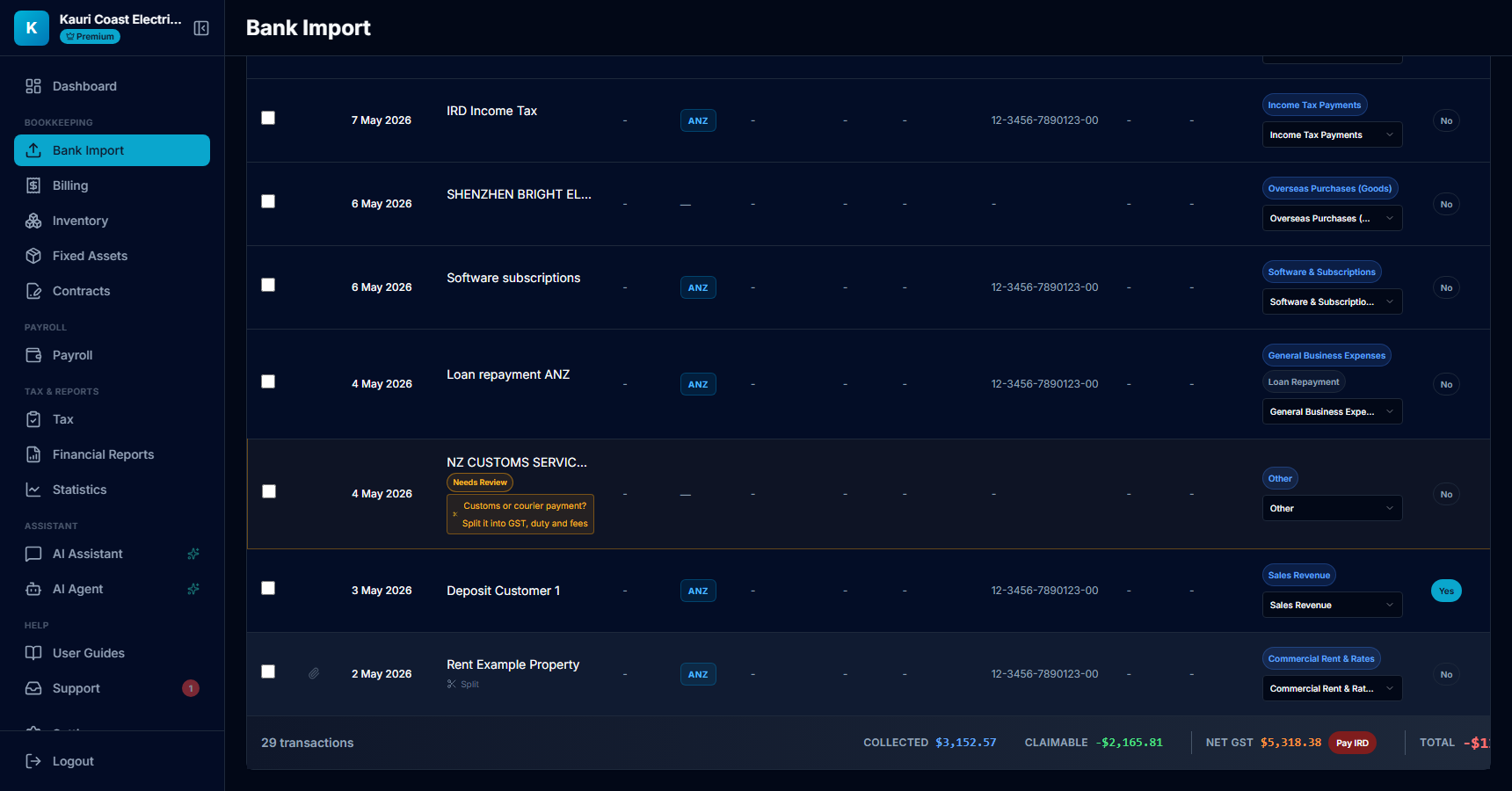
- A payment whose description mentions Customs, duty, a courier or a freight forwarder gets the amber hint. Click it to open the split.
- Any other payment can be split too — hover a row and a quiet Split link appears under the description.
3. Copy the invoice lines into the split
Have the Customs or courier invoice in front of you: it lists the GST, the duty and each fee separately. Enter those lines. The parts must add up to the bank payment to the cent before the split can be saved.
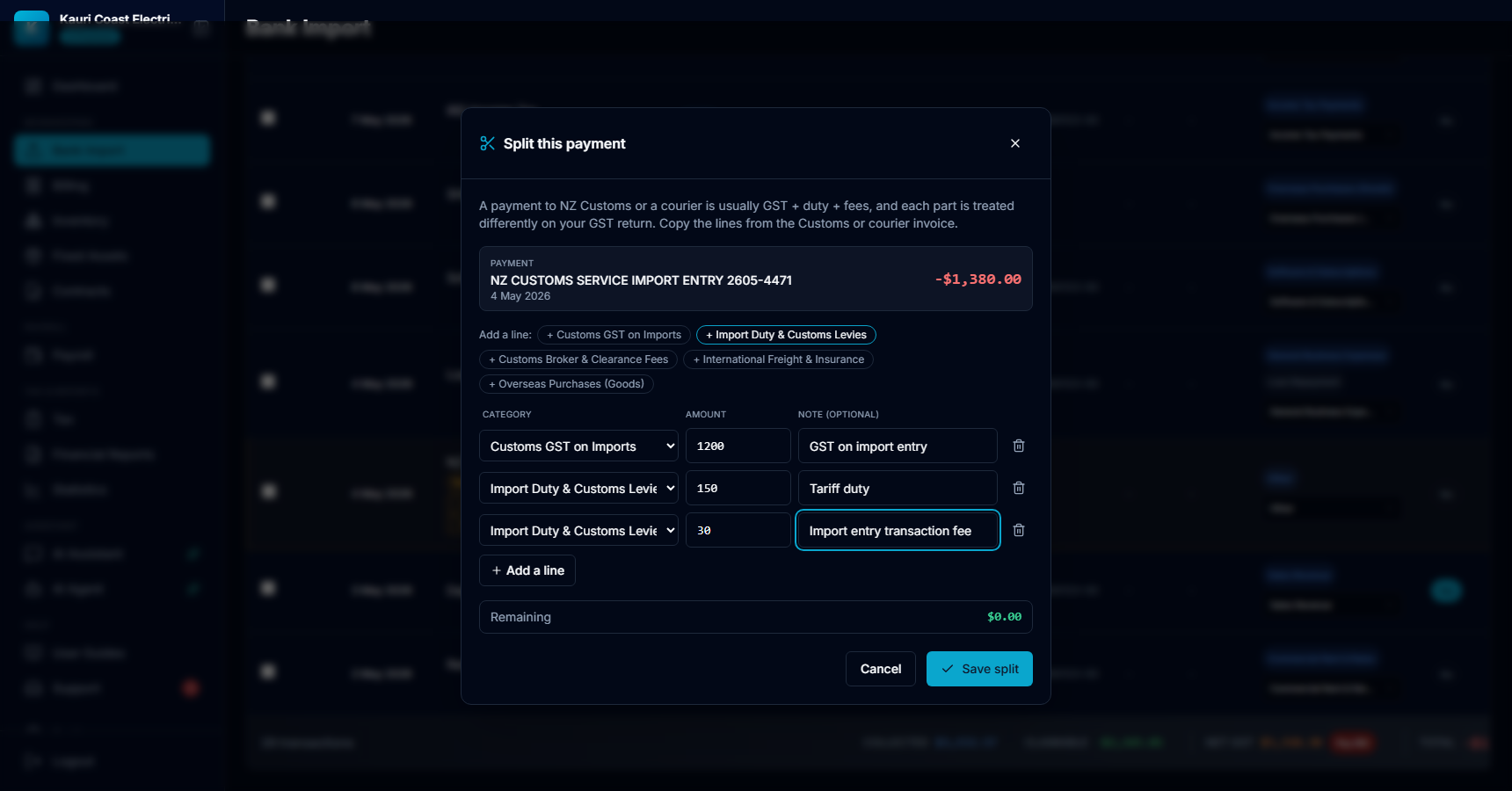
- The payment being split, with its date and amount.
- The chips add a line pre-set to that category. The dropdown on each line offers every category if you need something else.
- Amount and an optional note — the note becomes the start of the part's description, so "Tariff duty · NZ CUSTOMS…" is what you will see later.
- Remaining must read $0.00. Double-click an amount box, or use the Use remaining button, to drop whatever is left into that line.
Tip: Import entry transaction fee and biosecurity levy are duty-type charges with no GST: put them under Import Duty & Customs Levies. A broker's own service fee is a normal NZ supply with 15% GST — Customs Broker & Clearance Fees.
4. One bank line, three parts
The bank line stays, marked as split, and its parts sit directly under it with their own categories. Only the parts carry money; every total, the GST return and the P&L read the parts and ignore the parent.
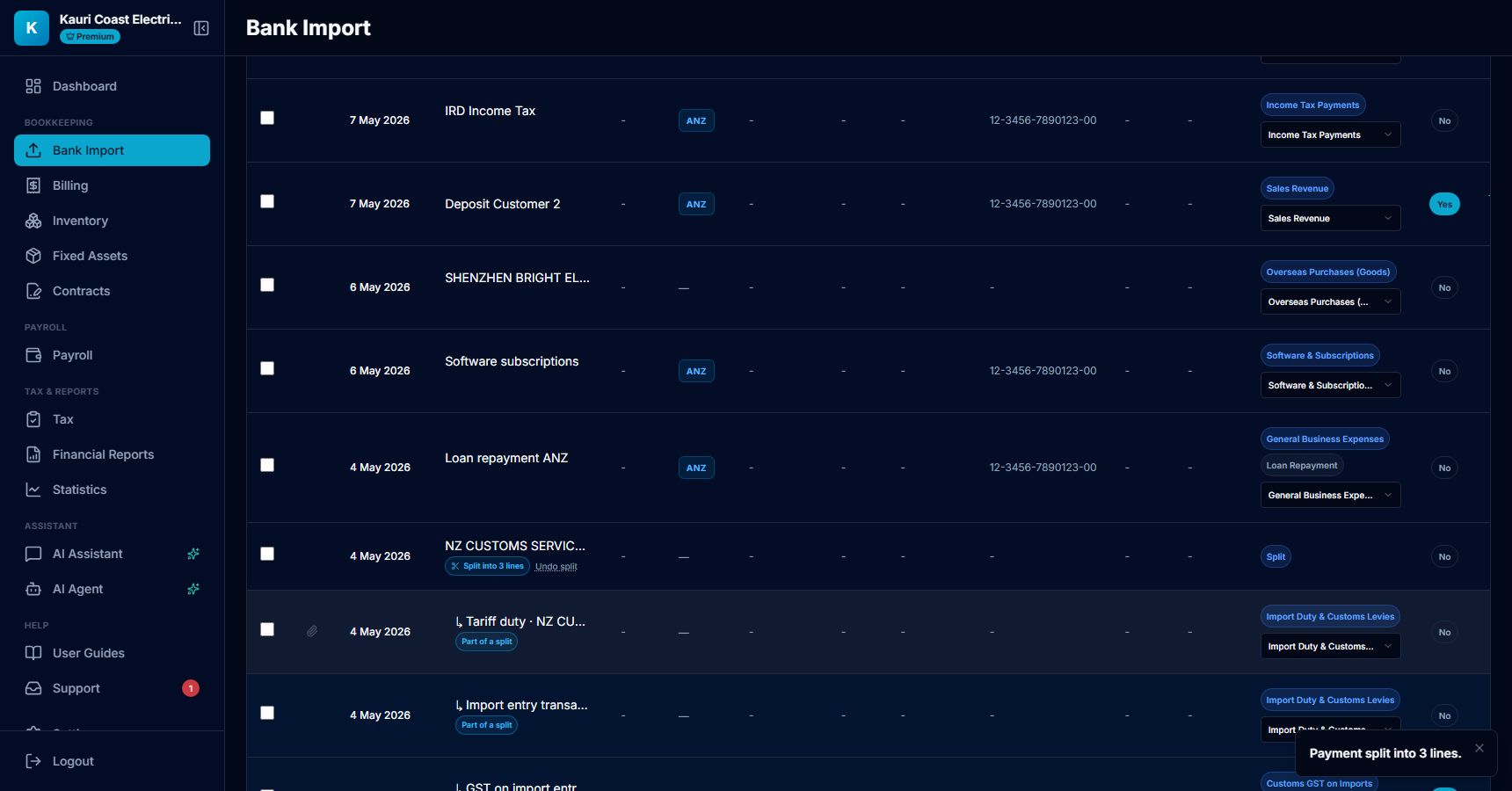
- The parent shows how many parts it has. Undo split removes the parts and hands the payment back for categorising.
- Each part is a normal transaction: it can be recategorised, filtered and exported like any other.
- Only the Customs GST part shows a GST amount — the whole $1,200 — because that line is GST. Duty and fees claim nothing.
5. The GST return sees the difference
Tax › GST Returns now has an Imports & exports section for any period that contains these lines. It lists each one with its treatment and where it sits on the GST101A, so what you file matches what Customs actually charged.
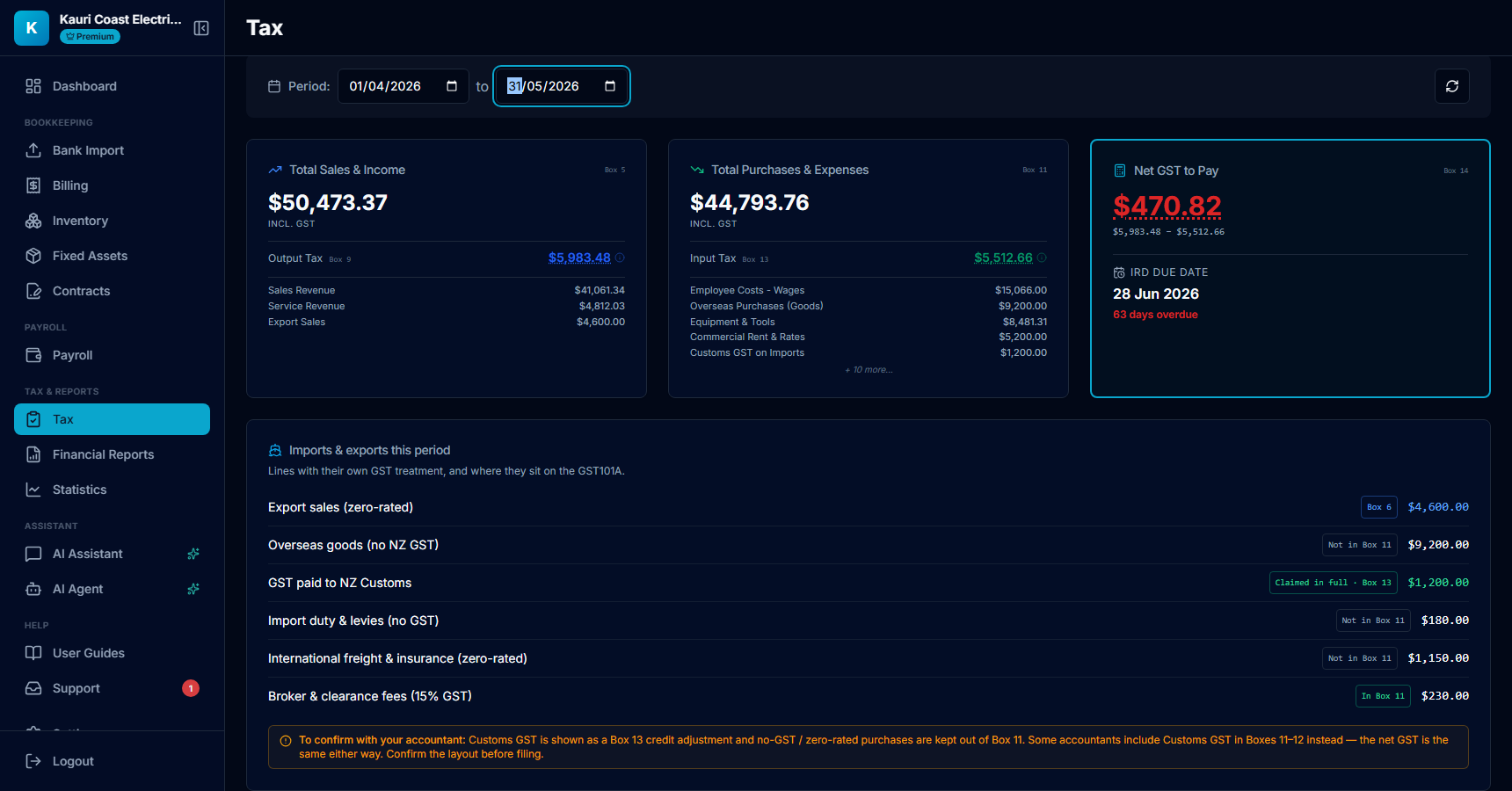
- Export sales are counted in total sales (Box 5) and shown as zero-rated in Box 6; no output tax on them.
- Overseas goods, duty and international freight have no GST, so they stay out of Box 11 — otherwise Box 12 would claim 3/23 of amounts that never had GST in them.
- GST paid to NZ Customs is claimed in full and shown as a Box 13 credit adjustment. The net GST is the same whichever box it goes in.
- The amber note is deliberate: confirm the box layout with your accountant before you file. Some prefer Customs GST in Boxes 11–12.
6. Dashboard: landed costs and the GST you get back
Overseas goods, duty, freight and broker fees are the landed cost of your stock. Like Stock Purchases they are shown under Total Expenses but reach the profit figure through Cost of Goods Sold on the Inventory page, so they are not double-counted. The Customs GST is not a cost at all — it comes back on the GST return.
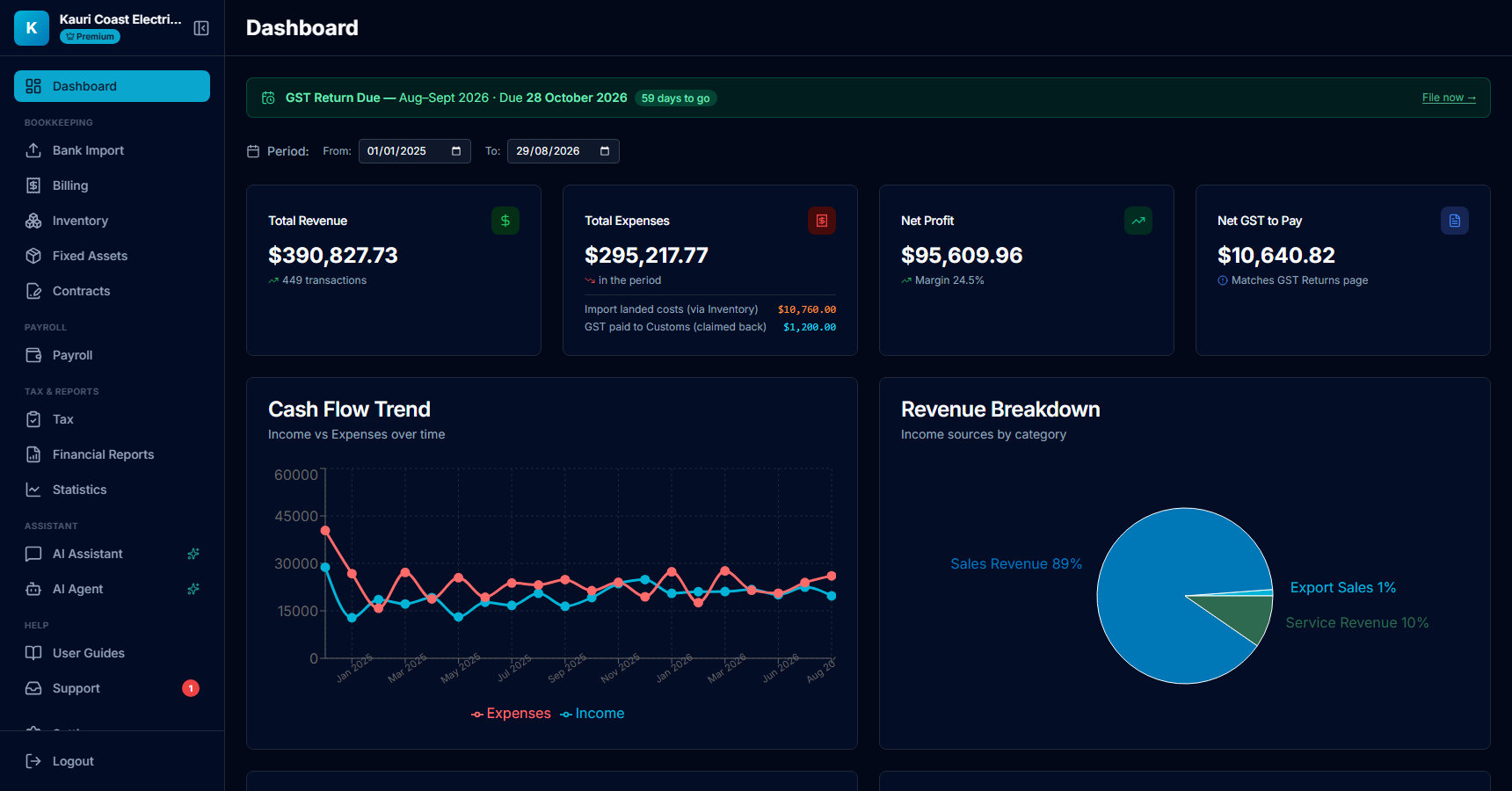
- Import landed costs for the period — the Inventory page suggests this figure, plus Stock Purchases, as your purchases for the year.
- GST paid to Customs — already in the GST return as input tax, so it is kept out of expenses.
Tip: Do a year-end stocktake on the Inventory page. Without one the app has no closing stock figure, and profit for a trading business is only right once opening + purchases − closing has been entered.
7. One shipment, all its costs
The costs of one lot of goods arrive as separate bank lines over weeks: the supplier, Customs, the forwarder, the broker. Shipments (under Bookkeeping) groups them so the landed cost of that lot reads off — net of the GST that comes back — and, with a quantity, the cost per unit you paid for each item. That is the figure your margin and your stock valuation are built on.
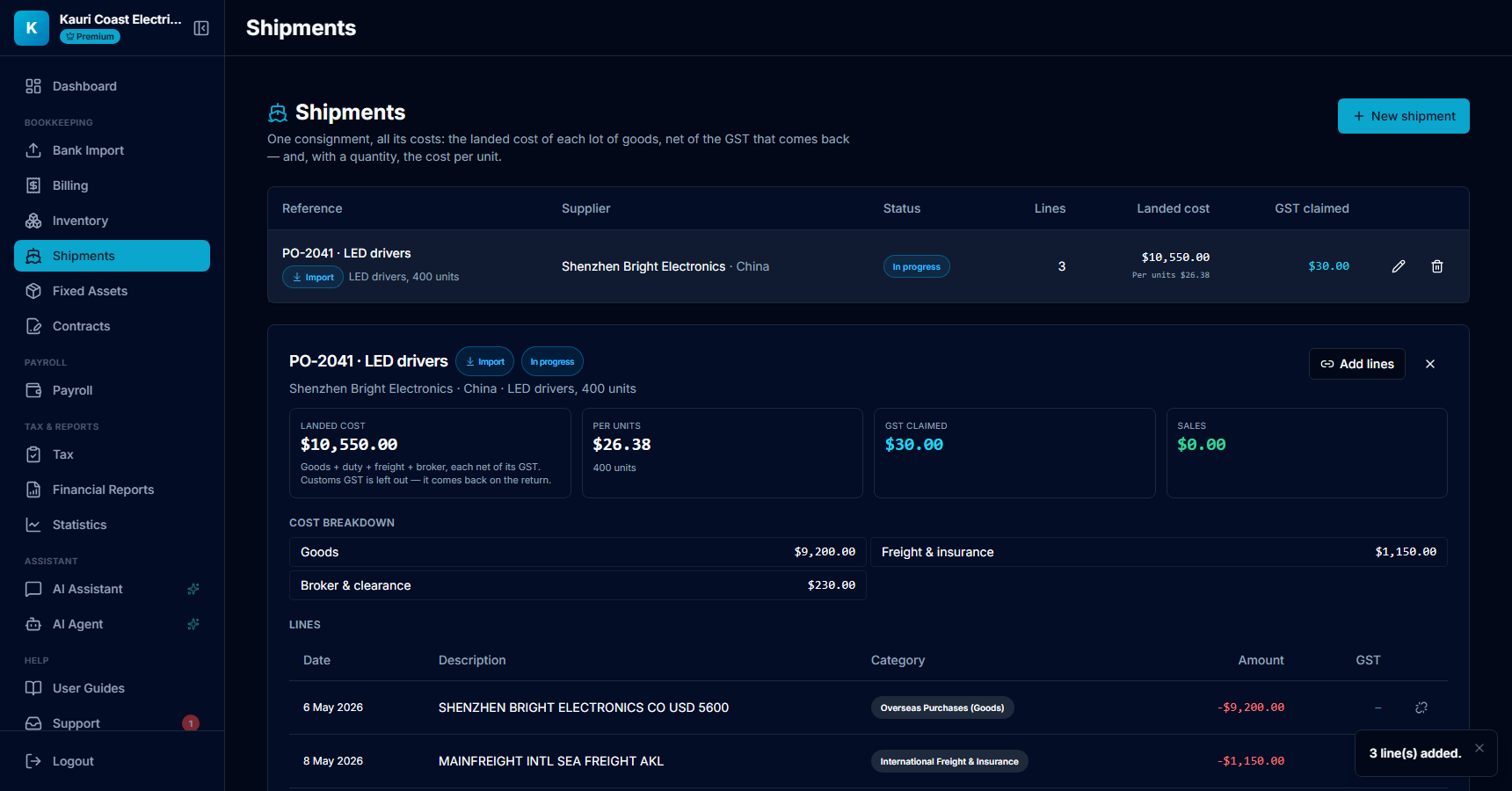
- New shipment: a reference you recognise (order number, container), the supplier and country, what is in it, and the quantity with its unit.
- Add lines opens a picker of import and export lines not yet on any shipment. Tick the supplier payment, freight and broker lines and they join the shipment.
- Landed cost is goods + duty + freight + broker fees, each net of its GST. The Customs GST line is shown but left out of the cost — it comes back on the return.
- Per unit divides the landed cost by the quantity; the cost breakdown shows where the money went.
Tip: An export consignment works the same way with Direction set to Export: link the sale, freight out and the export entry number, and keep the export documents — goods must leave NZ within 28 days for zero-rating to hold.
8. Read the Customs invoice instead of typing it
In the split dialog, Scan Customs invoice takes a photo or PDF of the Customs entry, courier duty & tax invoice or broker invoice. The GST, duty, fee and freight lines are read off it and fill the split; the document itself is attached to the bank payment as the evidence IRD expects behind an import GST claim.
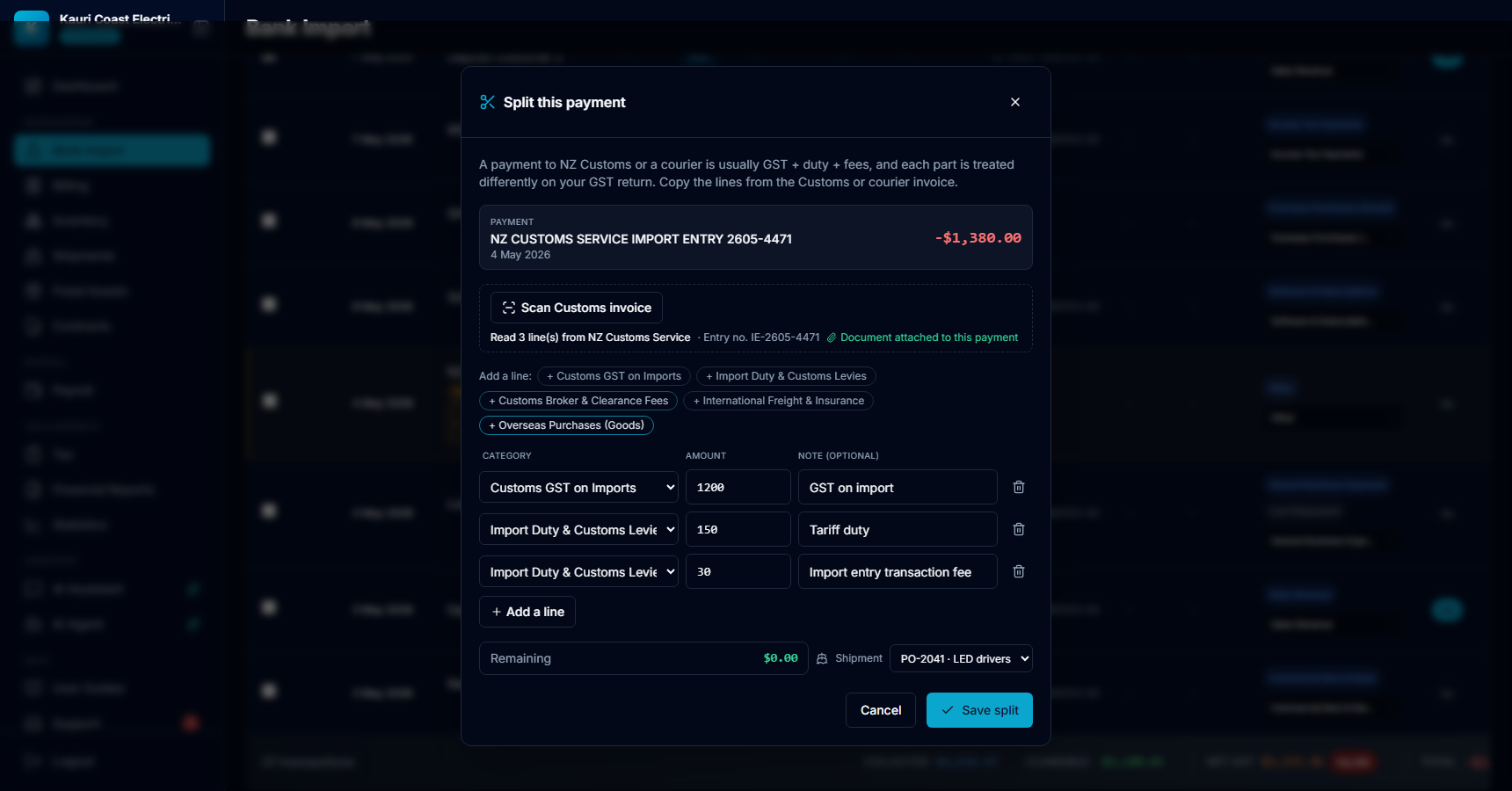
- Scan Customs invoice — image or PDF. What was read is summarised next to the button, with the entry number; "Document attached" confirms the evidence is on the payment.
- The lines come from the document: GST, tariff duty, import entry fee, levies, freight, brokerage. Check them against the paper — a blurred photo reads badly, and Remaining tells you if something is missing.
- Choose the shipment here and every part lands on it as it is saved, so the Customs GST and duty join the landed cost without a second step.
9. Your accountant signs the period off
If a practice looks after your books on the Team plan, each GST period can carry their sign-off. From the Practice Portal work queue the accountant opens the period, checks the imports section and the evidence, and marks it reviewed with a note. You get a Support message, the GST page shows who signed and when, and the figures at that moment are kept — if anything in the period changes afterwards, the page says so.
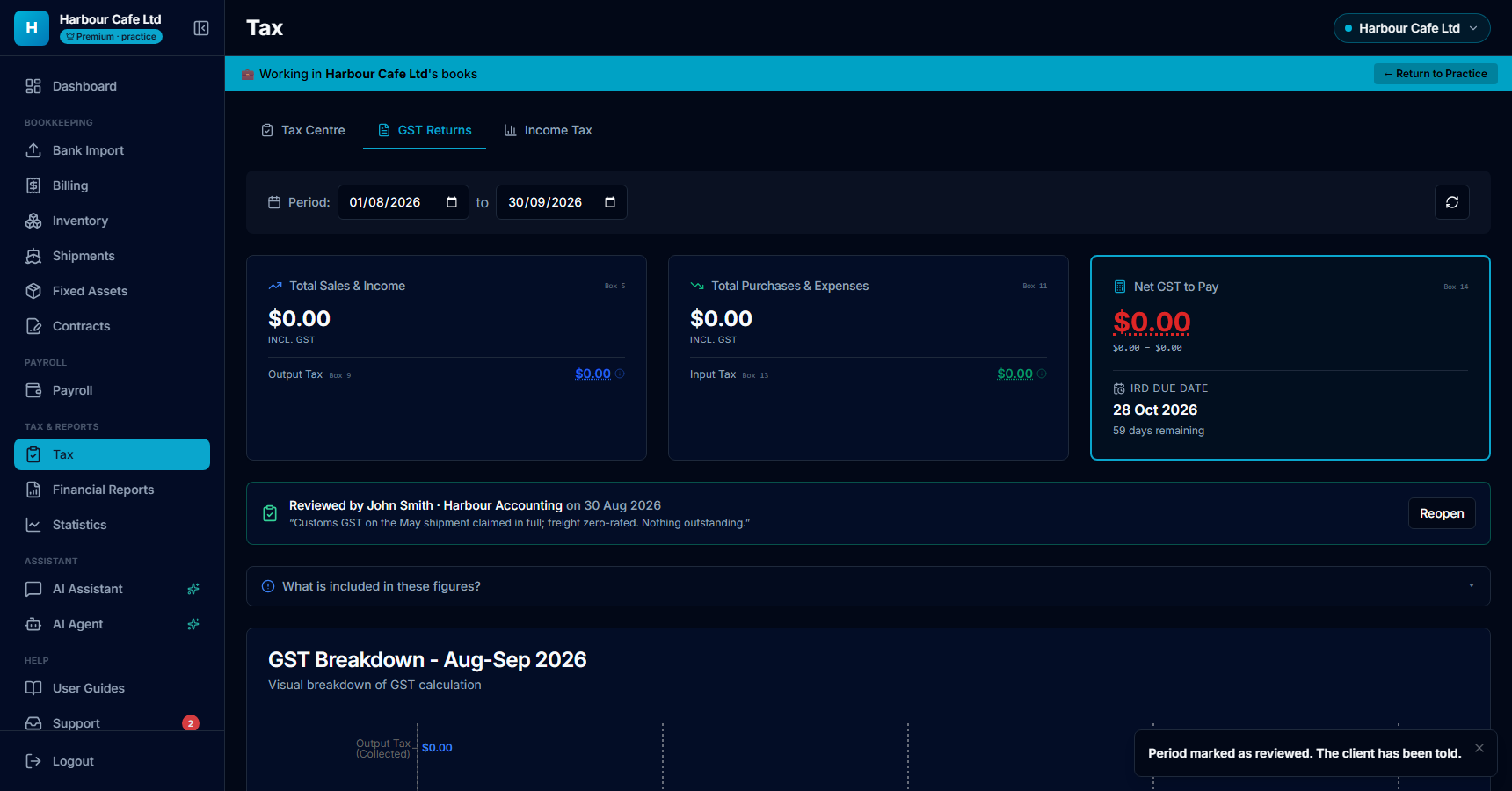
- The sign-off card: who reviewed, for which practice, on what date, and their note.
- Only the practice with an active link to these books (or its staff seats) sees Mark as reviewed and Reopen. You cannot sign your own period off — the value is the accountant's name on it.
- Figures changed since the review appears if the period's net GST no longer matches what was signed — ask for another look before filing.
- On the Portal the work queue shows To review / Reviewed for every client, so nothing gets filed unchecked.
10. Invoice an overseas customer
An export invoice is zero-rated: 0% GST, and the document must say so. Billing lets you price it in the currency of the customer, mark it zero-rated, and record the NZD value at the time of supply. That NZD figure is what goes in Box 5 and Box 6 of the GST return, not what eventually lands in the bank.
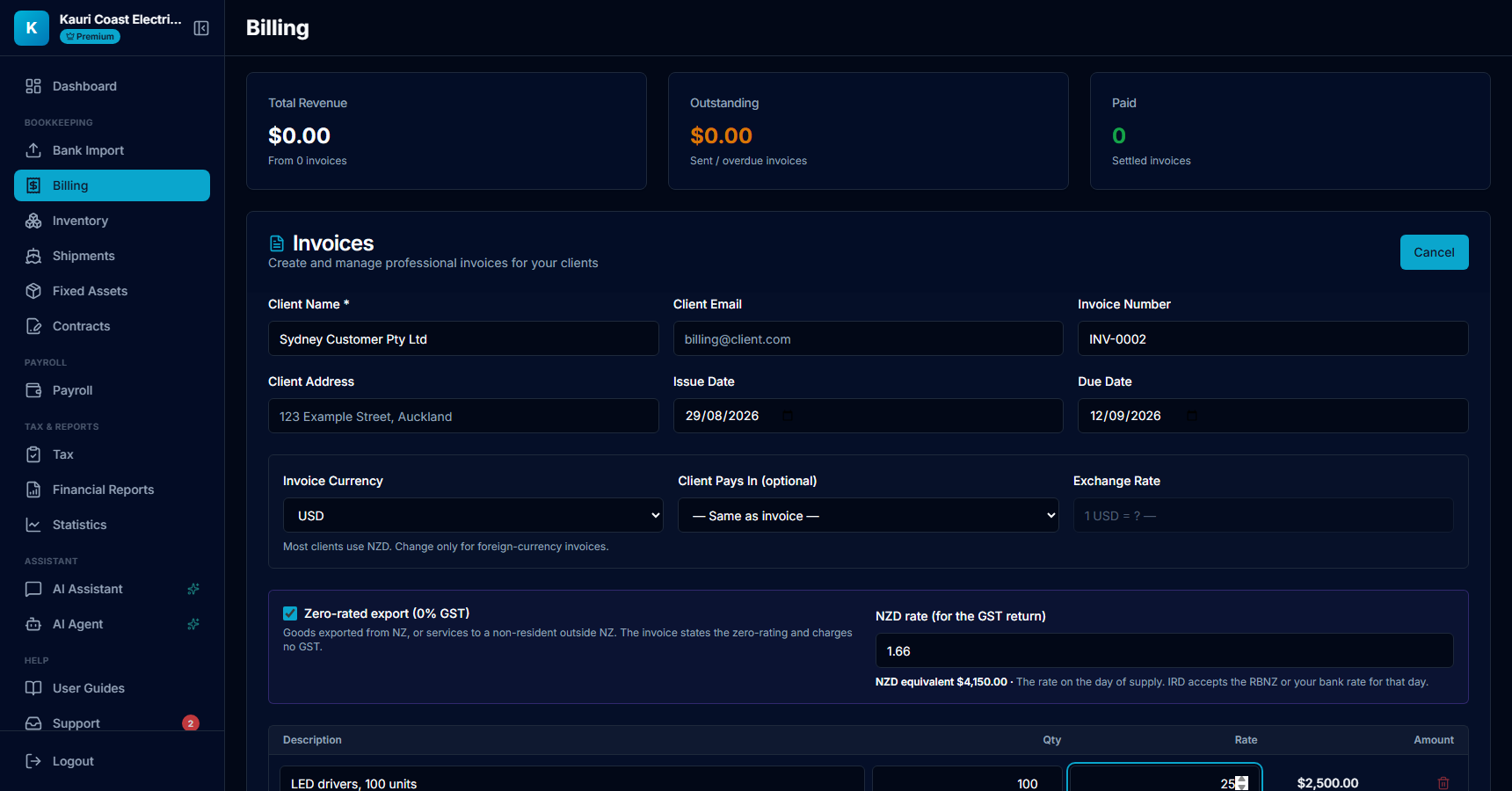
- Currency: price the invoice in USD, AUD, EUR, GBP or CNY. Client pays in and the exchange rate stay as before, for a client who settles in yet another currency.
- Zero-rated export (0% GST): no GST is added and the PDF states the zero-rating and the reason (GST Act ss 11 and 11A).
- NZD rate: the rate on the day of supply, from the RBNZ or from your bank for that day. The NZD equivalent appears next to it and prints on the invoice.
- Marking a foreign-currency invoice paid asks what actually landed in NZD; the difference from the NZD equivalent shows on the invoice as an FX gain or loss. Your bank line remains what the P&L counts.
Tip: Services for an overseas client are zero-rated only if the client is not in NZ when the work is done. Use the Export Services (Non-resident clients) category for the bank receipt; if the client or their staff were here, charge 15%.
11. Keep the proof that the goods left
Zero-rating a goods export holds only if the goods leave NZ within 28 days of the sale and you can produce the export entry, bill of lading or airway bill for seven years. An export shipment keeps both: the date the goods departed and the document. The GST page then tells you which export sales in the period still lack that evidence.
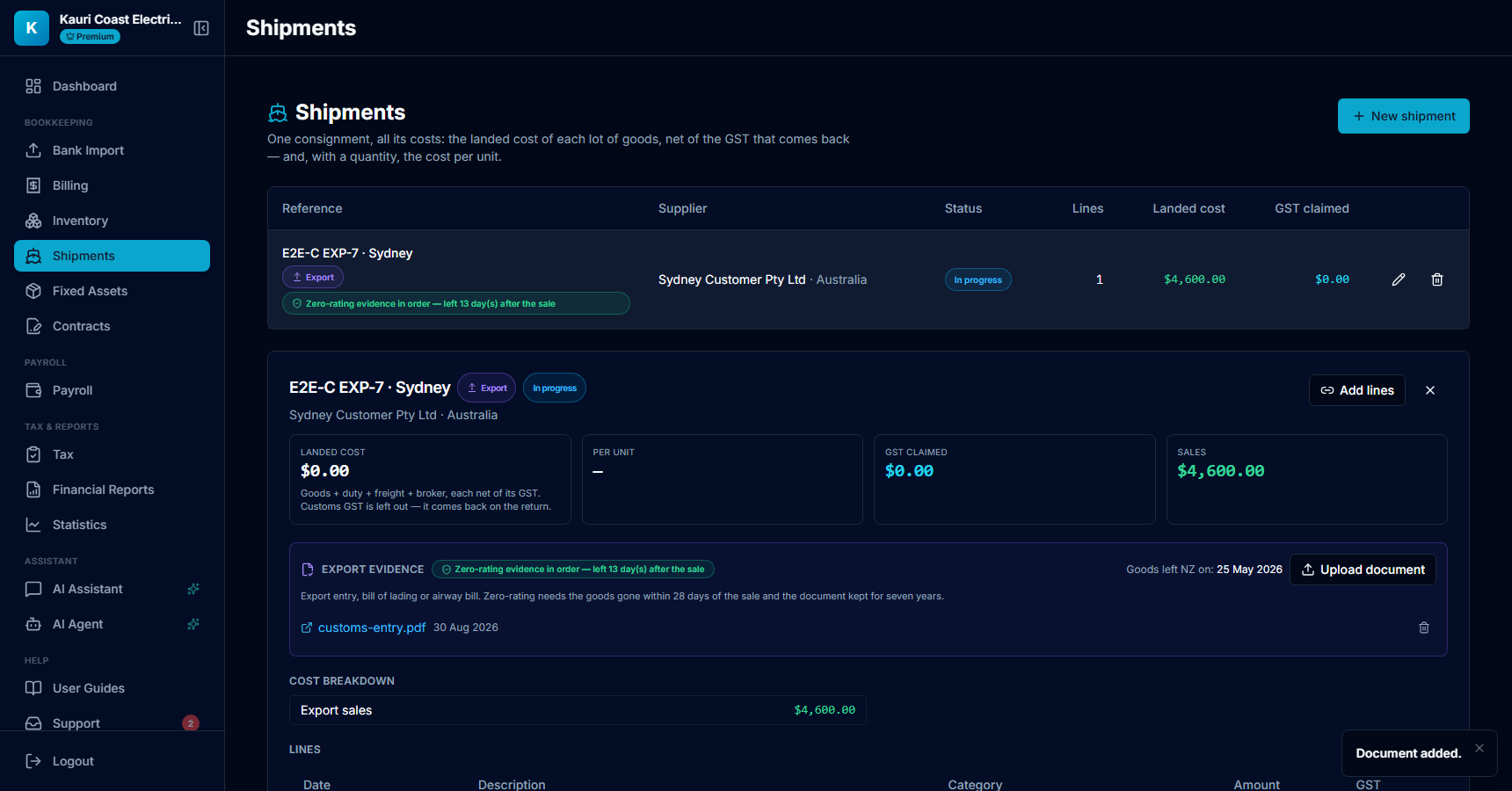
- Goods left NZ on: set it on the shipment (Edit). The chip compares it with the date of the linked sale.
- Upload document: the export entry, bill of lading or airway bill. Stored with your books like a receipt.
- Green means departed within 28 days with a document on file. Amber means no evidence yet, or departure outside the window: raise it with your accountant before filing zero-rated.
- Tax › GST Returns lists export sales without departure evidence for the period, and any that left NZ more than 28 days after the sale.
Tip: If your accountant files Customs GST in Boxes 11/12 rather than Box 13, switch it in Settings › GST (Customs GST on the GST101A). The net GST is identical; only the box tags on the GST page and the IRD filing payload change.
Common questions
Do I have to split every Customs payment?
Only the mixed ones. If the whole payment is the GST line (a broker paid the duty separately, say), categorise it straight to Customs GST on Imports and skip the split. Split when one payment covers GST plus duty or fees.
The courier charged me duty and GST together. Which lines go where?
Read the courier's duty & tax invoice: the GST line goes to Customs GST on Imports (claimed in full), duty and the import entry fee to Import Duty & Customs Levies (no GST), and the courier's own clearance or handling fee to Customs Broker & Clearance Fees (15% GST, claimable). The courier's international freight, if itemised, is zero-rated: International Freight & Insurance.
An overseas marketplace charged me NZ GST on a small order. Can I claim it?
Give the seller your GST number first — a GST-registered business should not be charged on low-value goods. If you were charged anyway, you can only claim it with a tax invoice from the seller (they can issue one for orders up to $1,000). With a tax invoice, book it under a normal 15% category; without one, treat it as Overseas Purchases (Goods) and nothing is claimed. Ask your accountant if the amounts are significant.
Why does the app put Customs GST in Box 13 rather than Box 11?
IRD's guide treats GST paid to Customs as a credit adjustment, which is Box 13, and the purchases boxes then hold only supplies with GST inside them. Many accountants include it in Boxes 11–12 instead; the net GST is identical either way. The GST page shows both figures so your accountant can fill the return the way they prefer — confirm before filing.
Where does the overseas purchase itself go on my profit and loss?
Into the landed cost of stock. Overseas Purchases (Goods), duty, international freight and broker fees are excluded from operating expenses and reach profit through Cost of Goods Sold on the Inventory page, exactly as Stock Purchases do. Overseas Services & Subscriptions is an ordinary operating expense.
Do I have to use Shipments?
No. Categories and the split are enough for the GST return to be right. Shipments add the landed cost per consignment and per unit — worth it the moment you want to know what an item really cost you, or when your stock valuation should reflect duty and freight rather than the supplier invoice alone.
Where does the scanned Customs document go?
It is stored with your books for seven years, like a receipt, and attached to the bank payment you split. The paperclip on that row on Bank Import opens it. IRD expects the Customs entry or the courier's duty and tax invoice behind any import GST claim.
Which exchange rate do I use on an export invoice?
The rate on the day of supply, usually the invoice date. IRD accepts the Reserve Bank rate, the rate from your bank, or a consistent monthly average, as long as you use the same source every time. Enter it as 1 unit of the invoice currency = X NZD. If the client pays into your NZD account, the NZD amount at the time of supply can be used instead.
Do I pay GST on an FX gain, or claim it on a loss?
No. Exchange differences are outside GST. For income tax the gain is income and the loss is deductible; the app records the difference on the invoice so your accountant can see it, and your bank line stays the amount the P&L counts.
Does the AI classify these lines for me?
The new categories are part of the classifier's vocabulary, and Bank Import flags Customs and courier payments with the amber hint. The split itself is deliberately yours to do: the only place the GST, duty and fee amounts exist is the invoice in your hand.