Running your practice from the Practice Portal
For accountants and firms on the Team plan: add client companies, work in their books, import statements in bulk, keep an eye on every GST deadline, and give colleagues their own login.
Team plan · 9 min read · Updated August 2026
1. Your practice, your trial
Sign up through For Accountants in the site header rather than the standard sign-up. The moment you verify your email you are on a 14-day trial of the full Team plan — every feature, up to three client companies — and you land here, in the Practice Portal. Nothing to pay and no card; we activate a permanent plan once you have had a look around.
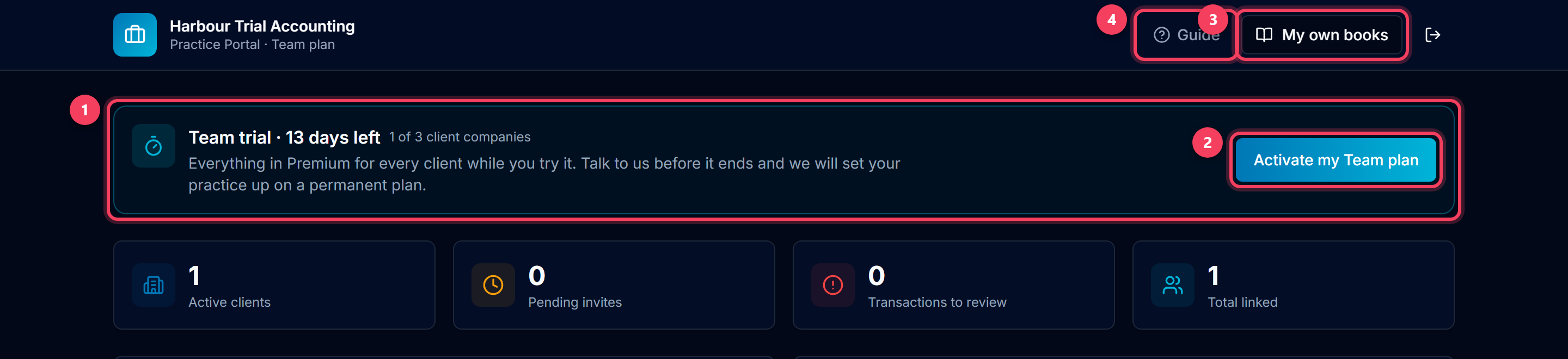
- The trial banner counts down the days and shows how many of your three trial client companies are in use. When we activate your plan the cap disappears.
- Activate my Team plan opens a Support message to us with the request already written — send it and we set your practice up permanently.
- My own books is your practice's own account: its own bank feed, invoices and GST. Client work never goes here — see step 4.
- Guide brings you back to this page.
Tip: The first thing the Portal asks for is your practice's name. It heads the Portal and signs every invite you send, so give it the name your clients know you by.
2. Add a client company
Add client offers two doors. Create new company sets up a client that your practice manages — you fill in their details, they never need to log in. Invite existing user is for a business that already uses LedgerMind: they get an email and accept from their Settings, and stay in control of the access.
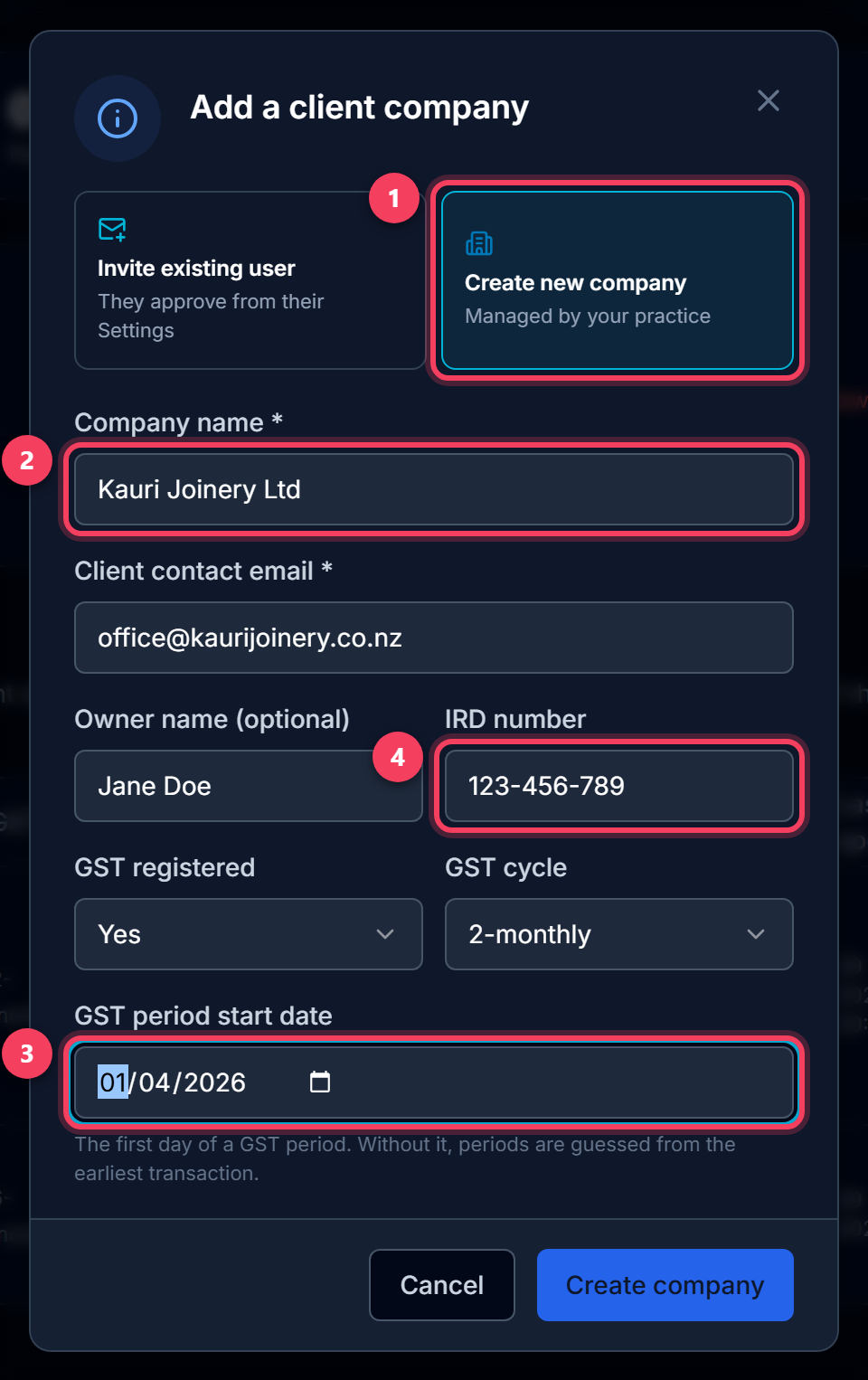
- Pick Create new company for a client you run the books for; Invite existing user when the client already has a LedgerMind account.
- Company name and a contact email. The email becomes the client's login should they ever want one — they use Forgot password to claim it.
- GST registered, the filing cycle and the first day of a GST period. The start date is what makes the client's GST periods line up with IRD; without it, periods are guessed from their earliest transaction.
- The IRD number goes straight onto the client's IR4 and GST pages.
3. Open a client's books
Each row is one client company. Open books switches the whole app into that client — Dashboard, Bank Import, Tax, Payroll, everything — exactly as if you had logged in as them. Import statement does the same but lands you straight on Bank Import, which is where most visits start.
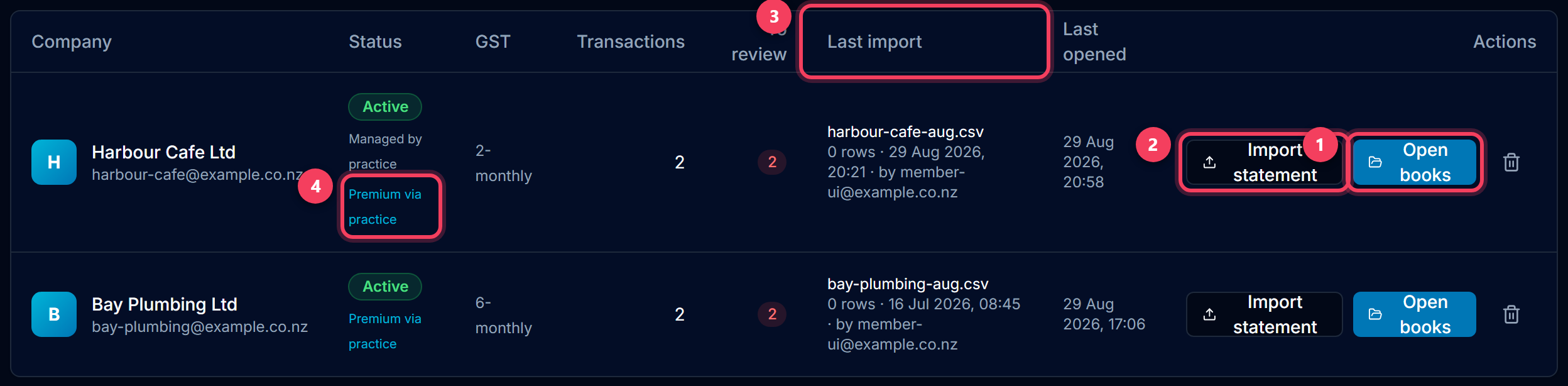
- Open books — the client's Dashboard.
- Import statement — the client's Bank Import page, ready for a file.
- Last import shows the most recent statement that went into this client's books, how many rows it added, and who imported it — the quickest way to confirm a file landed in the right place.
- Premium via practice: every client company you manage has every Premium feature, covered by your Team plan. The client pays nothing.
4. Always know whose books you are in
Inside a client, two things stay on screen: the company pill at the top of every page, and — on the pages that write transactions — an "Importing into" card naming the company the file will go to. If you are in your practice's own books instead, that card turns amber and tells you so, because a client's statement imported there simply vanishes from the client's view.
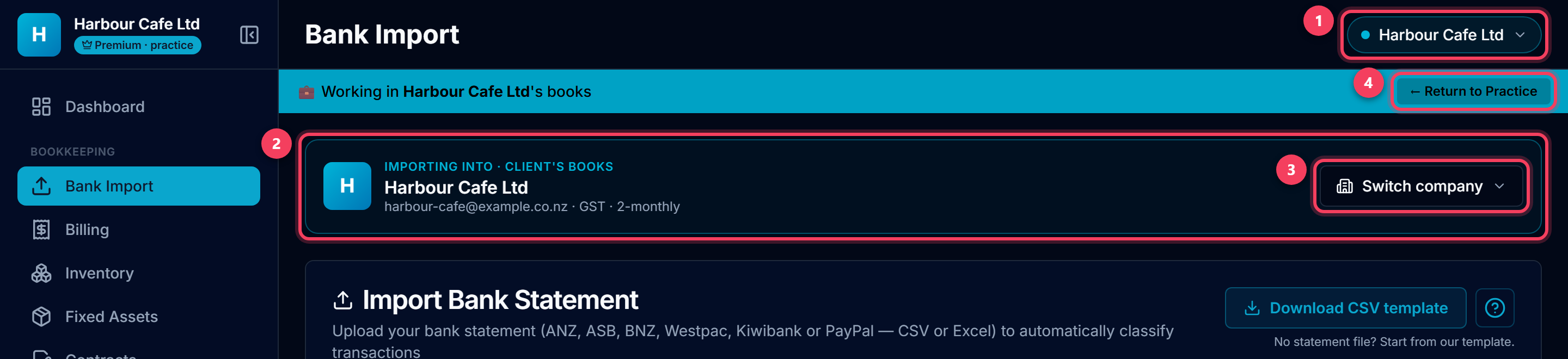
- The company pill: whose books this page is showing. Teal for a client, amber for your practice's own books.
- Importing into — the company the statement is about to go into, with its GST cycle for a sanity check.
- Switch company opens the same list as the pill, without leaving the page.
- Return to Practice takes you back to the Portal.
5. Switch between clients without leaving the page
Click the pill (or Switch company) and pick another client. The page you are on stays — Bank Import stays Bank Import — only the books change. The tick marks where you are now.
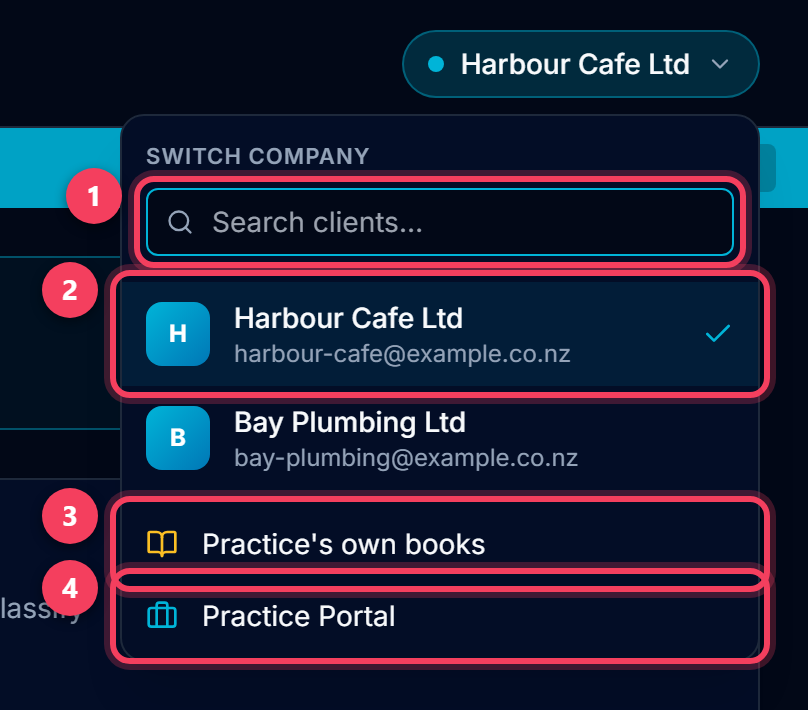
- Search by company name or email when the list is long.
- Every active client. The tick is the one you are in.
- Practice's own books — your own account, for your own bookkeeping.
- Practice Portal — back to the client list.
6. Your work queue
The Portal opens with what needs doing across every client, so you do not have to open each one to find out. Both lists come from the same rules the reminder emails use.
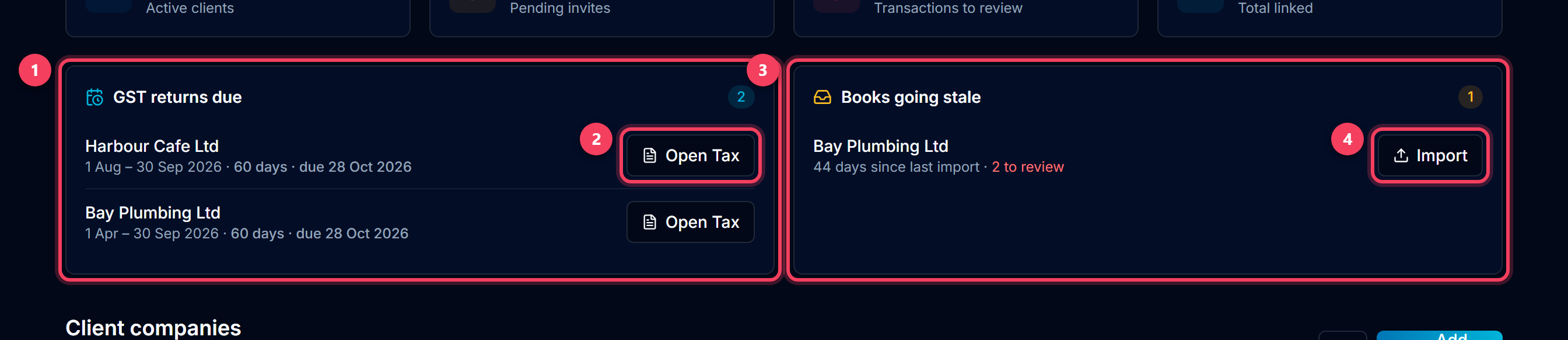
- GST returns due — each client's next return: the period, the due date and days left. Amber inside three weeks, red once overdue. A return you have marked filed in the client's Tax page drops off.
- Open Tax lands on that client's GST return with the figures worked out.
- Books going stale — clients with no statement for 30 days, or none ever, with how many rows still need review.
- Import takes you straight to that client's Bank Import.
7. Import several statements at once
Month end rarely means one file. Drop every statement you have into Bulk import and each is matched to a client from its file name — "harbour-cafe-aug.csv" goes to Harbour Cafe Ltd. Check the match, then import them all. Each file goes through exactly the same import as a single upload: duplicates skipped, categories suggested, the upload logged with your name on it.
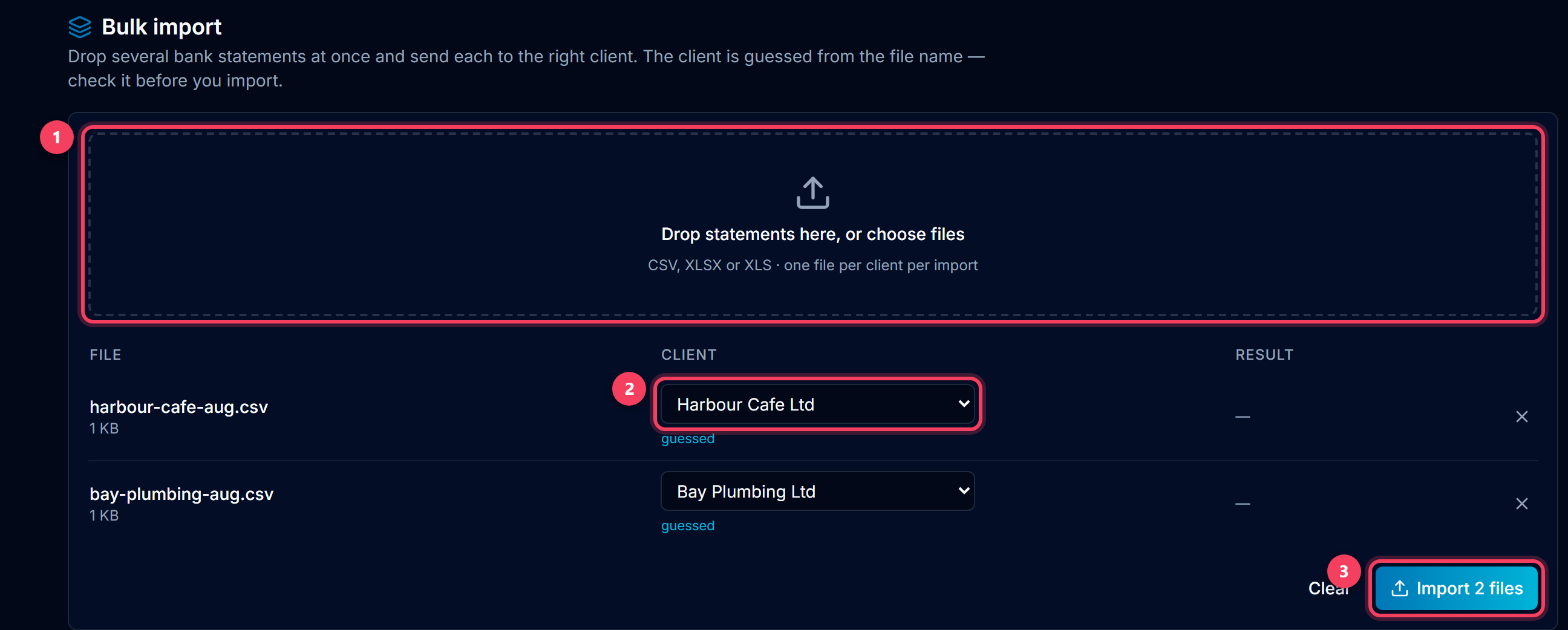
- Drop files here, or click to choose. CSV, XLSX and XLS, one file per client per import.
- The client each file goes to. "guessed" means it was matched from the file name — change it if the guess is wrong.
- Import runs the files one after another and shows how many rows each one added.
Tip: Name the files after the client before you drop them — a company name or the client's email in the file name is enough for the match.
8. Give colleagues their own login
Nobody should share a password. Team members lets you give a colleague a seat: they accept from their own free LedgerMind account and then see this Portal, the switcher and every client — while every import records that they, not the practice login, did it. They cannot manage seats or the plan.
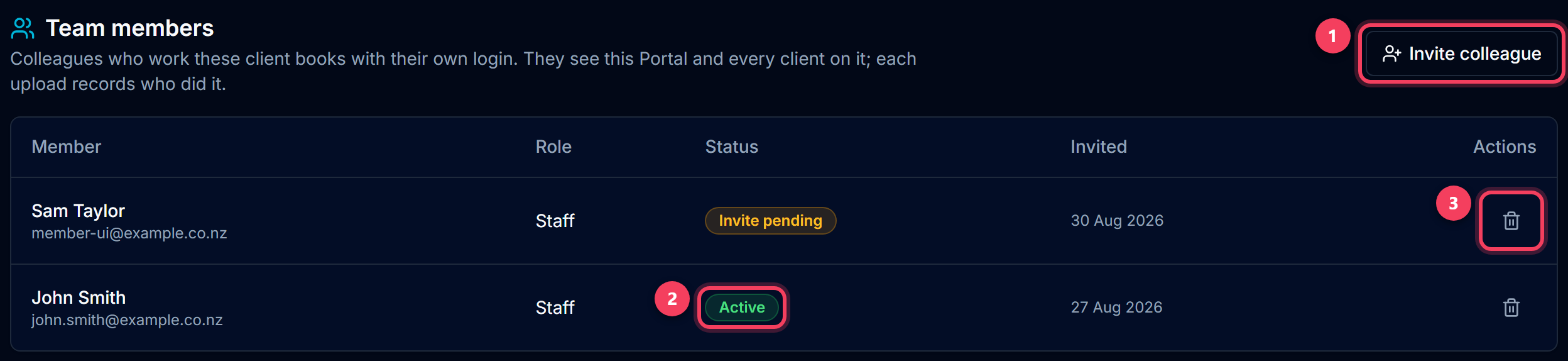
- Invite colleague — an email is enough. If they do not have a LedgerMind account yet, the invite tells them to create one with that address.
- Invite pending until they accept from their Dashboard; Active once they have.
- Remove seat takes the Portal away again. Their own account is untouched.
9. What your clients get
A client company you manage is a real LedgerMind account with every Premium feature switched on — covered by your Team plan, whether you open its books or the client signs in themselves. If they do sign in, they see the same books you do, with a "Premium · practice" badge explaining where the plan comes from.
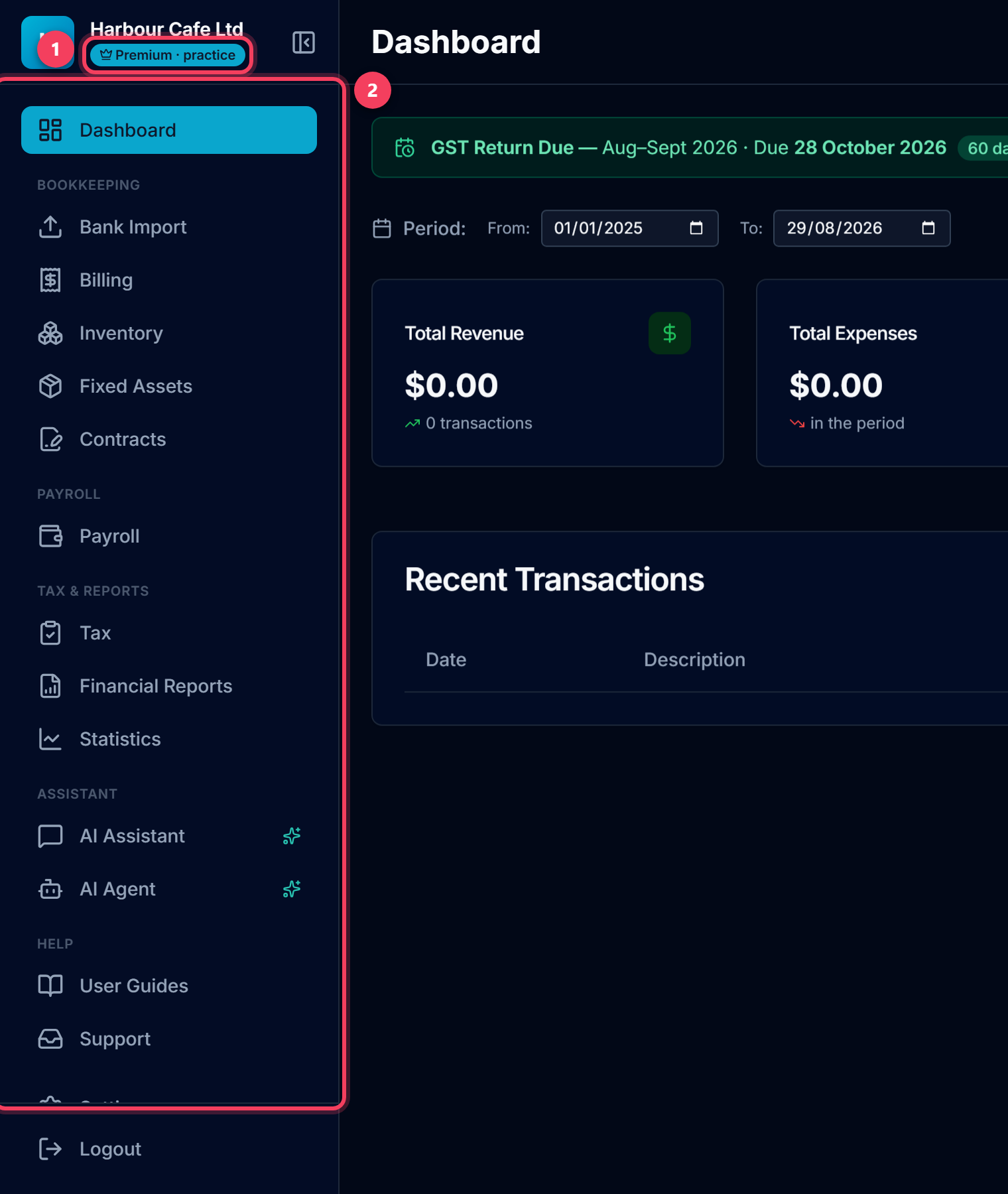
- Premium · practice — the plan the company actually has, and why.
- Nothing is locked: Payroll, Financial Reports, the Loan Pack and the AI assistant are all there.
Tip: A client can see and revoke your access at any time from Settings → Accountant access. If they do, their books drop back to whatever plan they pay for themselves.
Common questions
What happens when the trial ends?
The Portal becomes read-only: you can still see your client list, but not open, invite or create clients until we activate your plan. Your clients' companies, books and logins are untouched. Activate my Team plan on the banner — or a reply to any message from us — gets it set up permanently.
Do my clients pay for Premium?
No. Every client company linked to your practice has every Premium feature under your Team plan, at no cost to them. Their own plan only matters again if the link is removed.
Can a client see what I do in their books?
Yes — it is their account. Every statement you import is logged with your name (or your colleague's) against it, and they can revoke your access from Settings → Accountant access whenever they like.
How do we file GST and income tax for a client?
Open the client's books and go to Tax. GST Returns works out the GST101A boxes from what has been coded; Income Tax builds the IR4. File in myIR as the client's tax agent, then press Mark Filed so the due date clears from your work queue. Direct filing to IRD from inside LedgerMind is on the way.
What can a team member not do?
Seats are for doing the work, not running the practice: a member cannot invite or remove other members, cannot activate or change the plan, and their own account is separate from the practice's. Everything else — every client, every page, bulk import — is theirs.
I imported a statement and the client's dashboard shows nothing. Where did it go?
Almost always into your practice's own books: the pill at the top of the page was amber. Open the client from the Portal (or the switcher) and import again there; the stray import can be cleared from your own Bank Import page. The "Importing into" card exists to stop this happening.